You add more synth tracks, but the core of the song does not become stronger. After cycling through dozens of presets, you are left with similar pads and leads. Nothing sounds objectively bad, yet the finished arrangement still feels thin.
Trying to solve that problem by adding layers starts a fight for frequency space. The midrange crowds up, chords lose clarity, and the only job left is cutting tracks with EQ. The missing ingredient is not another layer. It is a single sound with a clear job inside the song.
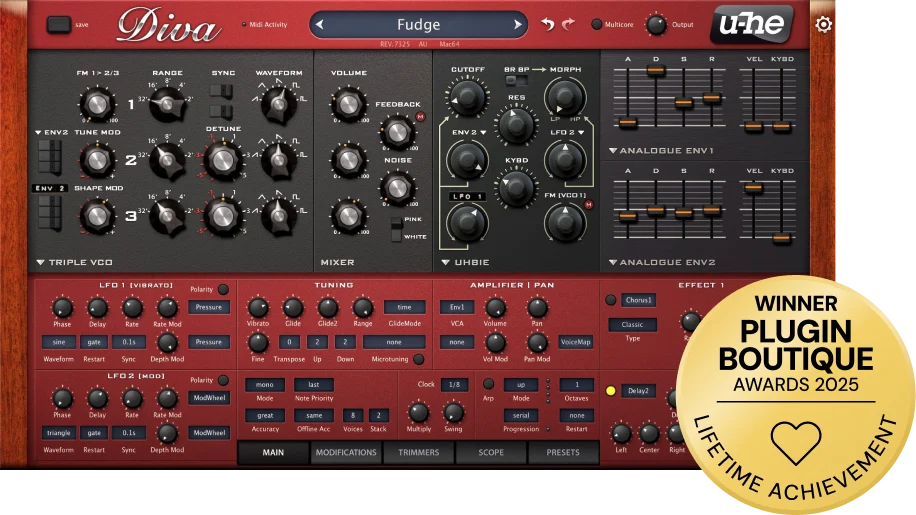
u-he Diva is not a plug-in designed to reproduce only one vintage analog synth. It lets you combine oscillator, filter and envelope models inspired by different circuits, then shape the attack, density and movement around a musical role. Instead of adding low end merely to make a bass bigger, you make the bass behave like a bass. Instead of stacking ambience to widen a pad, you create harmonics that move inside the chord. Diva gives you a way to rethink sound design in that order.
The Short Answer
The purpose of using Diva is not to own a huge collection of presets. It is to build sounds that carry one specific role in a track.
For bass, that may mean supporting the low end after the kick while keeping enough definition for phone speakers. For a pad, it may mean staying out of the vocal’s way in the verse and adding width and energy only in the chorus. For a lead, it may mean making the phrase audible through attack and filter movement instead of turning the fader up. Diva lets you select oscillator, filter and envelope combinations around those musical jobs.
The number of circuit-model choices can look intimidating at first. You do not need to touch them all at once. Start by deciding whether the part is bass, chords or the main melody. Once that role is clear, you have a reason to choose a waveform, filter, envelope and amount of movement.
Why Layering Synths Can Still Leave a Track Thin
A thin arrangement is not always caused by a lack of impressive sounds. When several synths occupy the same midrange, begin with similar attacks and sustain for the same length, adding tracks does not create depth. The ear no longer hears clear individual parts. It hears an unfocused block of sound.
Another cause is judging patches in solo. A preset that sounds spectacular on its own can easily compete with vocals, guitars, snares and hi-hats in a finished mix. In contrast, a patch that seems restrained in solo can become the structural element that holds the arrangement together. The real test of a synth sound is not how dramatic it sounds alone. It is whether it fills the right empty space in the arrangement.
The point of switching Diva circuit models is not collecting familiar vintage names. Different oscillator, filter and envelope models change how a sound grows, which harmonics remain and how it decays. The same MIDI part can become a forward bass, a supportive background layer or a rhythmic element with a different role.
What You Can Combine in Diva
Diva provides several oscillator and filter models. Some configurations are useful for dense unison character, some make a stable bass foundation easier to build, and others add a more digital edge to the attack. On the filter side, you can choose responses that close smoothly, push a sound forward or offer different filtering modes. The combination determines how the harmonics from the oscillators are organized.
Do not treat oscillators and filters as unrelated sections. Oscillator output levels influence the way the filter responds. When a sound feels thin, adding more unison is not always the answer. Choosing the oscillator structure and filter response together, then finding the point where the required midrange remains, usually produces a more mix-ready result.
Diva also includes envelopes, host-synced LFOs, an arpeggiator and stereo effects. Matching attack, decay and release to the tempo, then adding a small amount of movement to filter, pitch or level, can give programmed MIDI a sense of breath. The first goal is not dramatic modulation. The first goal is a sound that does not feel flat after repeated notes.
Start Diva from the Role of One Sound
When you open Diva, going straight into the preset browser can slow the session down. Write a one-sentence description of the role your arrangement is missing: “a short bass that supports the space after the kick,” “a chord layer that fills only the gaps around the vocal,” or “a narrow arpeggio that builds tension before the chorus.”
After naming the job, use the following order.
- Decide the register. For bass, decide how much low range it should own. For chords, decide how much room must remain for the vocal.
- Decide the note length. Choose whether the sound creates rhythm with short notes or supports space with long notes.
- Decide the harmonic direction. Choose whether the arrangement needs a round, crisp or slightly rough character.
- Choose one change. Add a small movement to filter, pitch, level or stereo width, not all of them at once.
The same preset can serve a different purpose when its register and note length change. A pad patch played low does not automatically become a bass, and a dramatic lead played high does not automatically become a main melody. Before diving into Diva’s deeper settings, decide the MIDI and arrangement job. That order prevents sound-design drift.
Building a Bass That Does Not Lose to the Kick
For a low bass, the first question is not sheer weight. It is the definition of the attack. A bass built only from sub content can feel satisfying on headphones yet disappear on a small speaker. Adding too much midrange can make it collide with the kick attack or the body of guitars.
In Diva, begin with the minimum oscillator structure and start with the filter relatively closed. Set a short-to-moderate amp attack, then adjust release around the tempo. If the low end swells long after each kick, the release may be too long. If the notes break apart and the bass loses weight, lengthen the release slightly or revisit the MIDI note length.
A filter envelope is a practical way to create presence. Rather than leaving the filter at one fixed position, let it open a little at the start of each note and close again quickly. That adds useful definition without inflating the low end. When the result clashes with the click of the kick, reduce the envelope amount or shorten its change instead of opening the filter further.
Use voice drift and fine detune sparingly on bass. Excess width can blur the center of the low end and alter the result in mono playback. Keep the low register centered and build audibility through a controlled midrange contour. That approach turns Diva’s weight into a dependable foundation for the song.
Add Energy to Chords Without Adding More Pads
When a pad feels thin, the common reaction is to add a layer. Similar pads stacked together often make chord voicings less clear. Before adding tracks, decide what is actually moving inside the existing chord.
For a Diva pad, slightly offset the oscillators and create a slow filter movement. An extremely long amp attack can make the chord’s core disappear at the beginning of the chorus. Keep enough level attack for the first beat to register, then make the filter movement slower. The chord starts clearly while its energy grows over time.
A pad described only as “something to fill space” usually ends up with too much reverb. A more specific job, such as “add upper harmonics to the chorus chords” or “place a small movement behind the vocal in the verse,” gives you a reason to use filter, LFO and stereo effects. Diva’s two effects slots can provide chorus, phaser, delay and plate reverb, but the goal is not to finish every sound inside the plug-in. The goal is to create the amount of width and movement that the arrangement needs.
Do not judge the pad while holding a chord and turning knobs in isolation. Play from verse to pre-chorus to chorus, then check where the sound is needed. If width belongs only in the chorus, automate filter opening or effect amount for that section. A pad with a changing role creates a larger arrangement without adding more layers.
Bring Leads Forward Through Attack, Not Just Level
When a lead disappears, raising the fader is tempting. Level alone can push the lead into the same foreground space as the vocal and snare, leaving less room for the rest of the mix. A lead needs more than constant loudness. It needs an audible beginning to the phrase.
In Diva, separate the jobs of the amp envelope and the filter envelope. The amp section controls how the level begins. The filter section controls how brightness begins. If a very fast amp attack becomes too hard, leave a little room in the amp attack and make the filter movement slightly faster. For a picking-like contour, a short filter envelope can provide the required definition.
Voice stacking and detune are useful for a thick lead, but they do not need to be active all the time. If the center loses focus, reduce the voice count and preserve the midrange through the filter. If only the final note of a chorus needs extra size, automate density or movement for that moment. Making the top of a phrase denser is often more effective than making the entire part bigger.
Use Envelopes Before LFOs to Create Motion
Diva includes tempo-synced LFOs and an arpeggiator. Both are useful, but using an LFO as the first solution for a static part can make movement feel mechanical. Establish the shape of each note with envelopes before adding cyclic movement.
For a rhythmic chord pattern, set the basic groove with amp decay and MIDI note length. Then add a small tempo-synced LFO to move the filter gently. Repetition gains variation while the rhythm remains clear. Starting with a large LFO leaves the rhythm unclear and makes the movement itself too obvious.
The same principle applies to the arpeggiator. A pattern will not become memorable if the harmonic motion and voicing are undecided. Choose the register and the rhythmic gap that the arpeggio should fill, then use tempo sync, swing and progression options to add feel. Diva is strongest when it animates a role you have already chosen.
How to Use Presets Without Letting Them Stop the Session
Diva includes a large factory preset library. There is no problem with using presets. A session slows down when a patch is chosen only by name or solo impact and never adjusted for the arrangement.
When you audition presets, check only three things first.
- Does the register fit the intended role?
- Does the note length fit the song’s rhythm?
- Does the patch already contain too much width or ambience?
Choose no more than three candidates and compare them with the same MIDI part inside the full song. Keep the sound whose role is clearest alongside vocals, drums, guitars and other synths, not the patch that is most dramatic in solo. After deciding, adjust filter, amp envelope and filter envelope before exploring deeper modulation.
A preset is not a finished result. It is material for finding a role. Since Diva’s circuit models respond differently, two presets labeled for the same genre can push forward, decay and occupy frequency space in very different ways. Looking at attack and spectrum rather than the preset name helps you find usable sounds faster.
Diagnose Thinness Before Adding Anything
Before searching for a missing frequency, separate the type of thinness you hear. A lack of low end, an attack that is too weak to be heard and a part that leaves no impression because it never changes are different problems. If they are treated as one problem, you start adding low-end boost, unison and reverb at the same time and lose track of the real cause.
When low end is missing, check oscillator structure and MIDI register. When a sound is present but difficult to hear, check the short contour of the filter envelope and the attack. When the arrangement feels flat, decide what should change between verse and chorus. Dividing the diagnosis before choosing Diva modules removes unnecessary layers and directionless EQ moves.
For bass, ask whether the sub is genuinely missing, whether the note disappears after the kick or whether the phrase is too short to support the groove. For pads, ask whether the upper chord content is missing, whether the pad is occupying the vocal’s range or whether the chorus contains no change. For leads, ask whether the problem is a lack of high end, a weak attack or a lack of rests around the phrase.
Diva can change dramatically through filter, envelope and voice handling even with the same patch. Narrow the issue down before turning knobs. Sound design is not the act of increasing the number of choices. It is the act of making the reason for each adjustment clear.
Three Starting Points for Three Roles
Bass, pads and leads are not merely categories of sounds. They are arrangement roles. Dividing the starting point makes Diva faster to use. The following settings are not finished patches. They are practical anchors for keeping the musical goal in view.
| Role | Decide first | Diva parameters to prioritize | Check inside the song |
|---|---|---|---|
| Bass | How much low end should remain after the kick | Oscillator count, amp release, filter envelope | Bars where kick and bass occur together |
| Pad | Which vocal range must stay open | Filter opening, attack, LFO depth | The transition from verse to chorus |
| Lead | How the beginning of the phrase should be heard | Amp attack, filter envelope, unison amount | Points shared with vocal or snare |
With bass, set release while playing together with the kick, rather than finalizing a large sound first and then writing MIDI. Too much remaining low end makes the groove heavy. Too little makes the foundation vanish. Diva’s amp envelope is central to matching bass length to tempo.
With pads, do not begin by deciding stereo width. First create space around the vocal and decide which portion of the chord changes between the beginning and the sustain. Once filter motion has a job, width can be added later in the amount required. Diva’s LFO is not an ornament that must always make a pad wobble. It can simply create one moving element inside a chord.
With leads, prioritize the entrance of the phrase over raw thickness. Choose one place to be heard: a rest in the melody, the end of a vocal line or the first beat of the chorus. A short Diva filter-envelope movement can place definition at that exact point. Giving purposeful brightness to one important note is more effective than making every note equally forceful.
Mistakes to Check Before Changing Circuit Models
Diva offers many options, so it is easy to keep swapping models when a sound will not settle. Changing circuit models can be useful, but it adds confusion when MIDI, register and envelope shape are still wrong. Check these mistakes before changing the core character of a patch.
The first mistake is overdesigning a sound in solo. Low end and ambience that feel pleasant alone can become excessive in the song. Keep Diva solo time short and bring in drums, vocals and the main chord parts early. Once the unnecessary material is audible in context, filter choices become specific.
The second mistake is adding movement everywhere. Heavy detune, voice stacking, LFO motion and chorus at the same time can showcase Diva’s character, but they also blur pitch and stereo focus. Begin with one moving element: pitch, filter or space. Keep the center for a lead, keep the center for bass, or move only the back edge of a pad. The organic character will then work inside the mix.
The third mistake is trying to make a chorus bigger through sound design alone. Opening a filter or effect will have limited impact if the chord progression, octave range and rhythmic density do not change. Before changing a chorus patch, check MIDI register, voicing and note density. Small sound changes become powerful when the arrangement changes in the same direction.
Small Automation Can Create a Clearer Arrangement
One of Diva’s strengths is its ability to give subtle movement to a sustained sound. The purpose of automation is not to display dramatic knob moves. It is to tell the listener that the song has entered a new section.
Moving from verse to pre-chorus, open the filter slightly and add a small amount of upper harmonic content to the chord. At the chorus, change voice width or filter opening by one step before increasing effects dramatically. In an instrumental section, moving the register of the notes can give the same patch a new job without changing the arpeggiator pattern.
Automation does not need to move a long distance. A change that is noticeable only when you switch between verse and chorus can still create a meaningful step for the listener. Decide where the song should feel different, then use filter, LFO and effects for that structural purpose.
Diva Is a Better Fit for Some Sessions Than Others
Diva excels when analog-style basses, pads, leads and arpeggios are central to the arrangement. The more carefully you shape attack, filter response and subtle variation around a role, the closer you get to sounds that are difficult to obtain through preset swapping alone. Techno, house, synth-pop, electro, ambient music and electronic layers in scoring are natural places for that approach.
A different instrument can be faster when you need a realistic acoustic instrument immediately, when the project centers on complex wavetable movement or when every track must remain as light as possible. Diva’s processing demand can change with selected modules and quality settings. Giving it a focused role on the few tracks that define the song is generally more practical than spreading it across every part.
You can prioritize responsiveness while writing, then use the required quality for final checks and rendering. Do not distribute detailed circuit simulation across every sound. Give it to the one or two parts that determine the identity of the arrangement.
A Practical Diva Checklist
- Before adding a new layer, describe the job of the existing synth in one sentence.
- For bass, check whether the contour remains after the kick instead of only judging low-end quantity.
- For pads, set filter and attack before adding more reverb.
- For leads, separate amp and filter envelope decisions before raising the fader.
- Add LFO only after the fundamental rhythm is clear.
- Compare presets in the full arrangement, never only in solo.
- For a chorus lift, automate filter or stereo change rather than holding one static sound all song.
- Use the highest quality settings primarily for key parts and final rendering.
This checklist brings sound-design decisions back to the arrangement even before you know every Diva feature. Rather than ending with “it seems better,” you can judge the result by the exact space the sound now fills.
FAQ
Is Diva suitable for beginners?
Yes, provided you do not try to swap several modules and build complex modulation immediately. Start with one preset and touch only the filter, amp envelope and filter envelope. That makes the connection between a control move and a musical role easier to hear. Beginners usually learn fastest by giving one bass note or one chord a small, precise purpose.
Do I need unison for Diva bass sounds?
Only when the song needs it. Low bass is often easier to mix when the center is stable. Use unison and detune to add midrange density or to make a chorus section more present. Trying to create all bass weight through unison can change the impression substantially in mono playback.
What should I do if Diva feels CPU-heavy?
Processing demand varies with the circuit model and quality configuration. Avoid locking every track to a high quality setting while writing, and prioritize the parts that carry the song. Printing a committed part to audio and using different quality settings for final rendering are also practical choices. Instead of avoiding sound design because of processing demand, reserve Diva for the sounds that earn its place.
How is Diva different from a typical virtual analog synth?
Many virtual analog synths are excellent. Diva’s distinctive approach is the ability to choose oscillator, filter and envelope models from different analog-inspired circuit designs and combine them. You can design a patch with a bass-oriented attack response and a lead-oriented filter response, rather than being limited to one fixed instrument architecture.
What should I remove first when starting from a preset?
Check excessive reverb, delay and chorus first. You do not need to disable every spatial effect, but judging register and attack before adding width makes the decision clearer. Establish the spectrum and note behavior in a drier state, then return only the ambience that the arrangement needs.
Conclusion
When a song remains thin despite more synth layers, the missing ingredient is not the number of sounds. Bass, chords and leads need distinct jobs, built from attack, harmonic direction and change over time.
u-he Diva is a soft synth that lets you combine circuit models and shape thickness, filter response and envelope behavior around those jobs. It suits producers who want to spend less time hunting presets and more time finding the point where one sound becomes useful inside a track.
The next time you open Diva, name the empty space that the new sound should fill before adding another layer. That one sentence can make sound design move much faster.


Comments