Three moments when atonal material stops the arrangement
- Drums and noise have no pitch, so they never connect to the chord progression. The rhythm may be interesting, but it remains a loop instead of helping the song develop.
- Every new shimmering chorus layer adds more midrange congestion. The number of tracks grows, while both the chords and vocal lose definition.
- Aggressive basses and effects become unstable in pitch when pushed harder. The energy rises, but the sound becomes usable for only a very short moment in the arrangement.
Drums, noise and bass can all be compelling source material. But when a pitch-ambiguous sound is placed only for atmosphere, its arrangement role remains unclear. The same issue sits behind mixes that become cloudy as more synth layers are added: existing material has not been given a harmonic job.
It is natural to keep adding processing when a sound will not fit
When a drum loop needs something extra, it is natural to try reverb, delay, EQ and then a new pad. When a bass needs more impact, it is natural to add distortion, move the pitch and try to correct the key center afterward.
The real issue is that processing keeps growing while the material remains disconnected from the song’s chords. Texture may improve, but the part still has no clear place in the arrangement. Sound design consumes the session while arrangement decisions are postponed.
That does not mean you have bad ears or insufficient theory knowledge. You need an entry point for choosing the harmony added to the material and keeping it away from conflicts with the key. Lunacy Bismuth applies resonance that follows selected chords or scales to atonal input, bringing sound design and harmony into the same task.
Solve the three problems with Bismuth
| Production problem | What Bismuth does | What changes in the song |
|---|---|---|
| Drums and noise have no pitch | Tune resonance to a chord or scale in the Chord Panel | The original rhythm becomes a layer with harmonic character |
| Adding synths clouds the midrange | Use hi-hats, percussion or FX as the trigger for harmonic resonance | Add chorus movement and upper harmonics without adding a new MIDI track |
| Rough basses and FX drift away from the key | Set harmonic position with Root, Octave and Spread, then shape duration with Attack and Decay | Keep the aggression while bringing the texture closer to the chord progression |
At Bismuth’s core is a resonant-filter system that creates harmonic layers tuned to selected chords or scales. It does not completely replace the source with a different synth patch. The rhythm, transient and noise content of the source trigger the harmonic material.
A hi-hat pattern becomes an upper chord rhythm. A kick or snare hit becomes the beginning of a pad. The noisy component of a rough bass becomes a top layer that follows the song’s harmony. Existing audio gains a new arrangement role, so adding more layers is no longer the only route forward.
What Bismuth changes in an arrangement
When a chorus needs more width, Bismuth can turn existing hi-hats or percussion into a harmonic layer before you program another synth arpeggio. A copied drum loop with a long Decay setting can create an ambient pad that rises with the rhythm. A duplicated distorted bass can gain colorful upper harmony without destroying the original low end.
Bismuth is not an effect for making audio merely prettier. It is an effect for changing the role of audio. It can reduce the time required to prepare separate rhythm, texture and harmony tracks, then help you build a chorus hook from material already in the project.
Product details:
https://www.pluginboutique.com/products/17061-Bismuth
Chord resonance is the reason it can create harmony
An EQ cuts or boosts frequencies already present in the source. A reverb adds a sense of space behind a sound. Both are essential tools, but neither one creates chord tones from an atonal drum loop or noise source.
A resonator uses energy in the input to excite specific frequencies. Bismuth lets you tune those resonances to a chord or scale. A short hit can become a chord-based pluck or swell. High-frequency noise can become a shimmering harmonic layer. The processed material begins doing harmonic work in the arrangement.
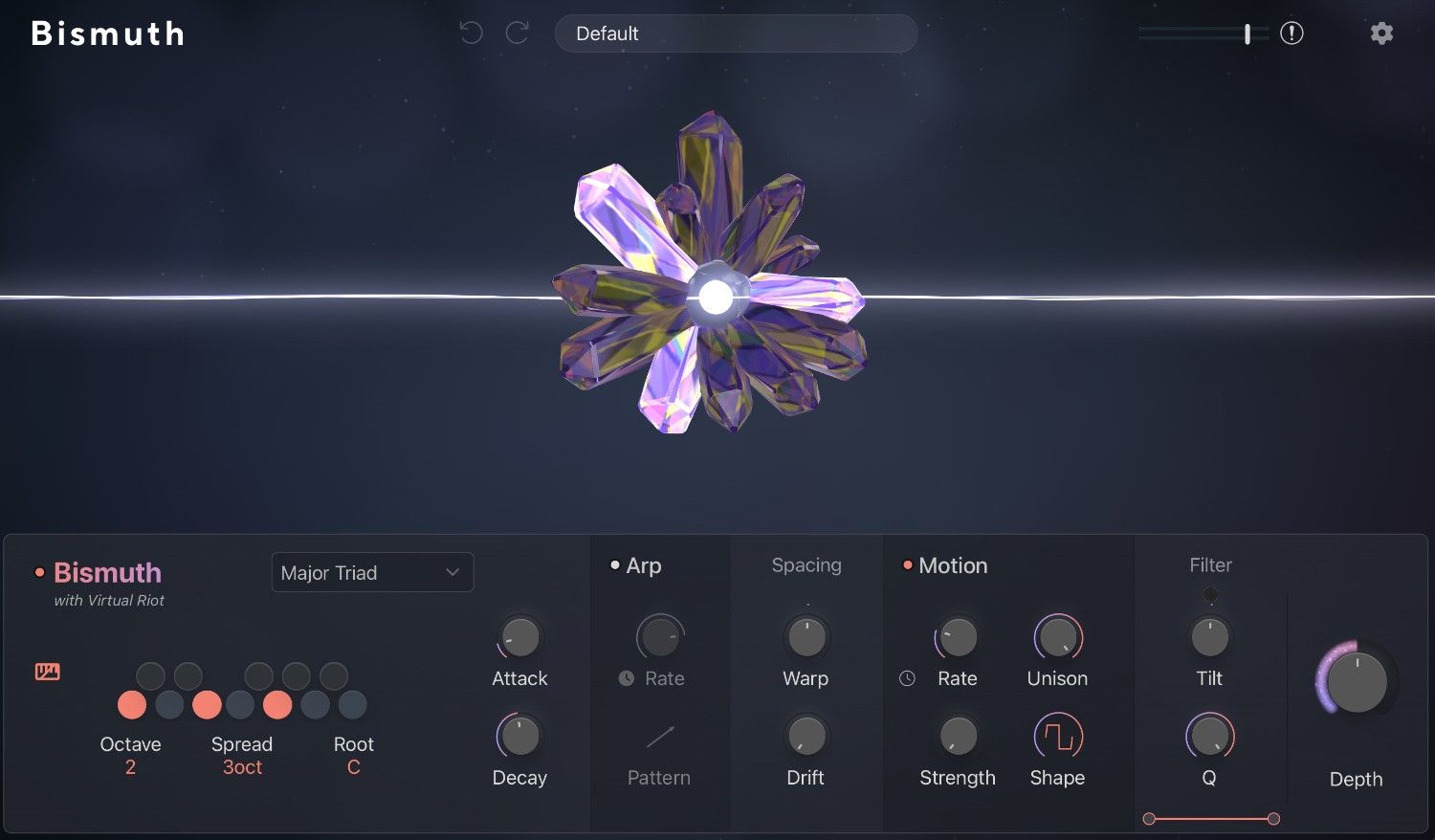
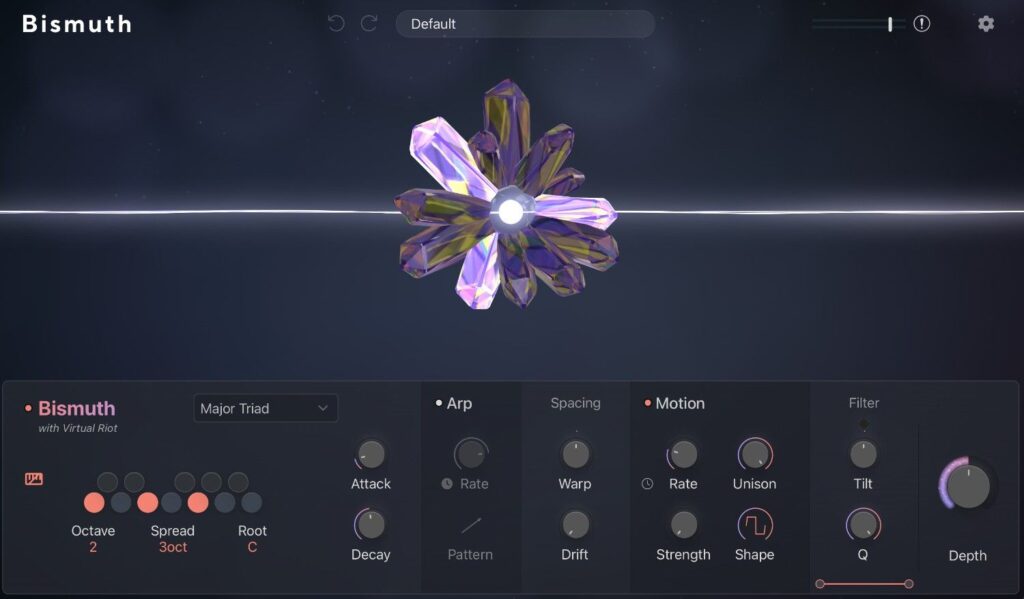
The Chord Panel lets you choose the chord or scale that determines the resonant notes. Root, Octave and Spread place the voicing. Attack and Decay determine how the resonance begins and how long it lasts. Short settings create plucks that follow the rhythm. Longer settings create pads that extend from individual drum hits.
Use Arp for movement and Motion or Spacing for character
Bismuth’s Arp cycles through notes from the selected chord, giving the resonance rhythmic movement. On sustained noise, drones, long vocal notes or reverb tails, Arp can place arpeggio-like harmonic motion over the source. Syncing Rate to the DAW tempo keeps the movement aligned with the beat.
Motion moves emphasis between the resonant components of a chord, creating internal movement in pads and long effects. Spacing reshapes the distribution of resonant frequencies, moving a clean chord toward metallic instability or an unreal sense of width. Driving Arp, Motion and Spacing hard at the same time can hide both the rhythm and chord identity. Assign the movement to one feature first to keep the character of the source intact.
| Goal | First controls to adjust | What to avoid |
|---|---|---|
| Create upper chord rhythm from hi-hats | Short Attack, short-to-medium Decay, upper Octave | Excess Spread and Decay that crowd vocals and cymbals |
| Build a pad from a drum loop | Long Decay, slightly slower Attack, chord selection | Raising only the processed signal until the original groove disappears |
| Add color to a rough bass | Upper chord tones, short Decay, low Mix | Leaving too much processed low end to blur kick and bass |
| Add development to a long noise or FX sound | Tempo-synced Arp, subtle Motion | Movement that becomes more prominent than the main melody |
Why this workflow is supported by the product design
Bismuth is a color resonator created in collaboration with Virtual Riot. It works as a standalone VST, AU and AAX effect and includes factory presets. Owners of Lunacy BEAM can also use Bismuth as a node inside BEAM, where multiple Bismuth nodes can be combined in serial or parallel with other Lunacy effects.
Chord resonance adds new pitched material. That makes Bismuth useful for connecting source audio to an arrangement, but it can also fill the low and midrange quickly. Splitting the dry source and the processed signal onto separate tracks is a practical starting point: let the original carry rhythm or low end, and let Bismuth carry harmony and space.
Three practical workflows by source material
Turn hi-hats or percussion into a chorus top layer
If you want to keep the original hi-hat, duplicate the track and insert Bismuth on the copy. Select the chorus chord in the Chord Panel and start in a higher octave. Use a short Attack and a short-to-medium Decay, then find the point where the rhythmic pattern remains recognizable. Raise the processed fader or Mix only in the chorus, and the existing rhythm starts functioning as harmonic sparkle.
Do not begin with wide Spread and long Decay in a vocal-heavy song. High-frequency chord resonance is noticeable even in small amounts. Find a level that stays out of the vocal sibilance, cymbals and lead range. That approach lifts the chorus without creating another synth layer.
Build a harmonic pad bed from a drum loop
Duplicate a drum loop containing kick and snare, then insert Bismuth on the processing track. Set a simple chord that fits the song key and avoid overly low octave settings. A longer Decay with a slightly slower Attack allows the harmonic rise to remain more audible than the click of the hit, so every kick or snare can launch a pad-like response.
Do not make the processed track so loud that the rhythmic core disappears. Let the original drum track retain its drum role, and give the Bismuth track the space-and-harmony role. High-pass or low-pass filtering after Bismuth can remove excess low end and painful high end, creating a division of labor that feels like separately added drums and pads from one loop.
Add color to a rough bass without losing the key
Do not ask Bismuth to carry the whole low end of a bass. Keep the original bass centered in the low register and use Bismuth on a duplicate track or send. In the Chord Panel, choose upper chord tones that do not fight the bass root and begin with a short Decay. First make sure the resonance does not pile up as the bassline changes notes.
A small amount of Arp or Motion can introduce inner harmonic movement to a sustained bass tone. Turning Arp, Motion and Spacing up together makes the bass contour and chord identity harder to hear. Choose one movement source and keep the Bismuth frequency range above the bass foundation. That separation lets aggression and key awareness coexist.
Keep chord changes from becoming muddy
Because Bismuth creates chord- or scale-based resonance, switching harmony is part of the sound design in a chord progression. A fixed chord can work for an effect that appears only during one chorus chord. With pads or processed drum loops moving through several chords, Decay from the previous chord can remain into the next one and create unintended overlaps.
For songs where the chord progression needs to stay clear, change Bismuth’s chord setting with the progression or shorten Decay so resonance does not continue into the next harmony. For abstract ambient passages and breaks, a scale-based setting can leave a more open texture without following every chord change. Decide whether the harmony should be explicit or whether the resonance should act as key-aware color. That decision determines how detailed the automation needs to be.
Lowering Bismuth’s Mix slightly at the exact bar where a chord changes can also help. Leave more Decay where a resonant tail is beautiful, and reduce the effect where vocal clarity or chord definition matters more. Moving the effect’s role with the song is often more natural than leaving one static setting across the entire arrangement.
Choose insert, duplicate or send based on the job
Inserting Bismuth directly on the source track lets you hear the relationship between dry audio and resonance quickly. For vocal chops, short FX or single percussion hits that need to become completely different sounds, a high Dry/Wet setting can be the clearest approach.
When original rhythm or low end needs to remain, a duplicate track or send is easier to control. With a duplicate, dry and Bismuth-processed audio can have separate faders, EQ and stereo placement. A hi-hat can remain a relatively centered rhythm part while the Bismuth copy becomes a wider harmonic layer. A bass can retain low-frequency duty while Bismuth handles color in the upper mids.
A send can feed several sources into the same Bismuth chord setting. Percussion, noise and vocal chops can then occupy one harmonic world. More input also means denser resonance, so begin with one source. Decide where the harmonic layer is needed in the song before sending additional material.
Set processing amount by musical role, not solo impact
Bismuth can sound so satisfying in solo that you want to turn it up. Chord resonance, Arp, Motion and Spacing can make the processed signal feel like a fully finished sound by itself. The arrangement does not need the maximum solo impact, though. It needs enough harmony and color while the dry source still carries the rhythm or low-end job.
Lower Mix or the processed-track fader completely, then bring it up slowly. There is usually a point where the chorus atmosphere changes, followed by a point where vocal or snare definition starts to disappear. The useful processing amount is not the loudest or most dramatic point. It is the point where the arrangement steps forward by one clear level.
Decide one goal before checking Bismuth
Before opening the product page, choose one source you want to transform. Do you want to turn a hi-hat pattern into a chorus top layer? Do you want a drum loop to trigger a pad? Do you want to add key-aware upper harmony to a rough bass? With one goal decided, Chord Panel settings and Dry/Wet choices become much easier to judge.
More details:
https://lunacy.audio/products/bismuth/
Sessions where Bismuth earns its place
Bismuth is particularly useful for color bass, dubstep, future bass, hybrid EDM, ambient production, game music and sound design for picture. It suits producers who want to bring drums, noise, vocal chops, FX or field recordings toward the song key and turn them into harmonic layers.
If you only need more drum punch, use a compressor. If you only need frequency correction, use EQ. If you only need natural space, use a conventional reverb. Bismuth creates new pitched material. Its purpose becomes clearest when existing audio needs a different arrangement role rather than simple repair.
One action for your next session
Choose one unused drum loop or noise recording. Set Bismuth to a simple chord that fits the song key, begin with a short Decay, then search for the point where harmony rises while the original rhythm remains. Once the source becomes part of the arrangement, you gain more ways to build the song before adding another synth layer.