Sonible’s smart series is known for AI-assisted processing. smart:chain brings that approach to a channel strip.
Open an EQ. Insert a compressor. Add a de-esser or dynamic EQ when an abrasive range appears. Add a gate when noise becomes distracting. Restore the output when the level drops.
You may be careful with every individual track, yet the balance can fall apart when the whole project plays. Clean up the vocal and the drums recede. Add clarity to the guitar and it collides with the synth. The more individual processors you stack, the further you can drift from the first rough mix.
Losing time in a mix is not only about lacking EQ or compression knowledge. It is also about treating every track as a separate problem and checking the relationships between them only at the end.
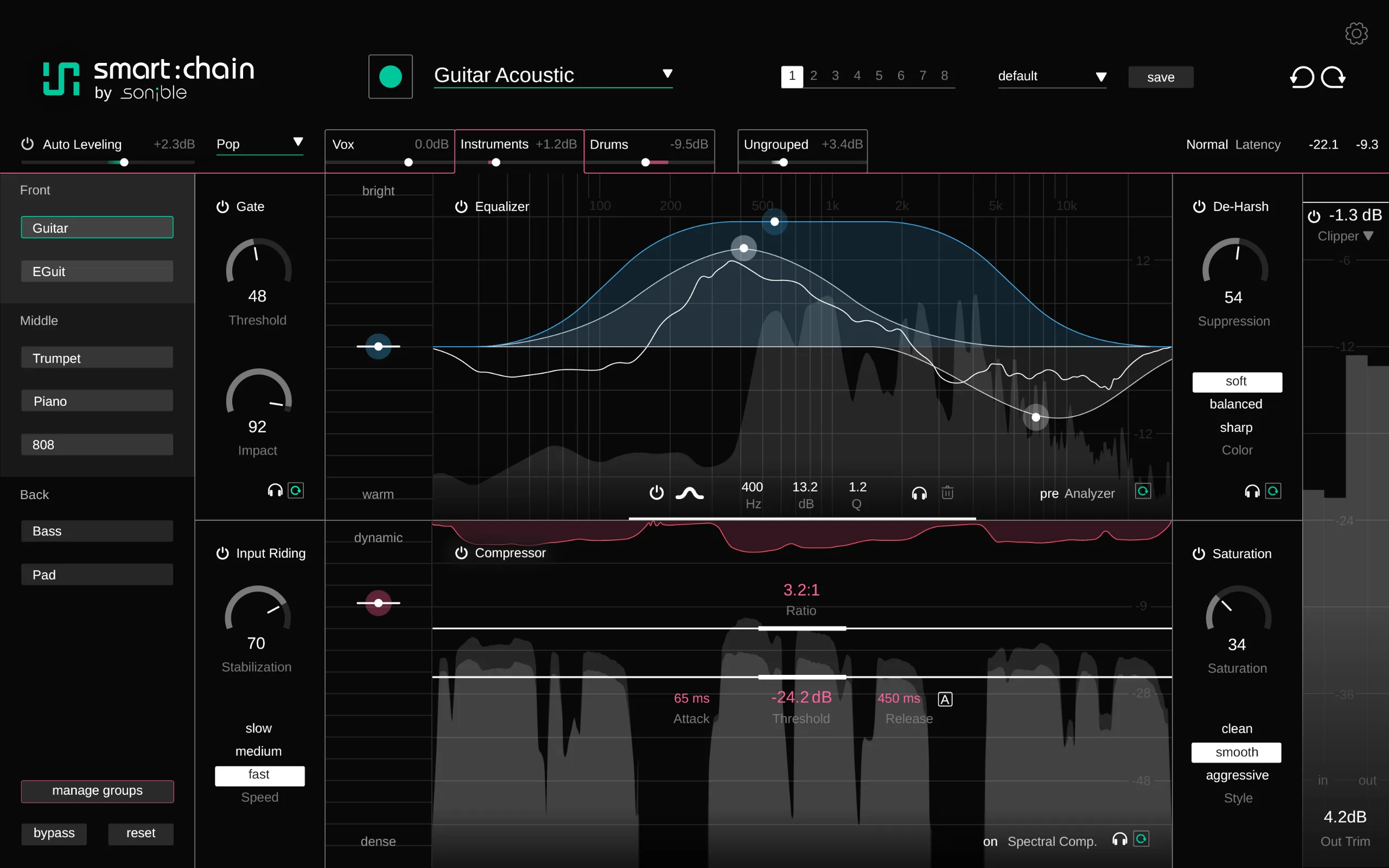
Sonible smart:chain is an AI channel strip that brings together EQ, compression, harshness reduction, gating, input-level tracking, saturation, and leveling. Rather than having each processor analyze the signal independently, it uses a shared audio analysis to establish a starting point for processing. Multiple smart:chain instances can also communicate within a project, so you can work with level relationships and depth across the whole mix rather than on one track at a time.
This is not a tool intended to replace every specialist plug-in. It is a tool for shortening mix preparation and giving time back to the listening decisions that deserve it.
Bottom line
Sonible smart:chain is especially useful when:
- Adding plug-ins track by track has made the level balance difficult to judge.
- You repeatedly rethink the order of EQ, compression, gating, and saturation.
- You spend too long building a rough mix and never reach arrangement or production decisions.
- You want to shape several tracks from one perspective and create front-to-back depth.
Letting smart:chain make every decision, however, can also soften the musical intention. The star of the song, the sounds that should be bold, the sounds that should remain deliberately rough, and the places where level differences are part of the arrangement still need to be decided by the producer.
The value of smart:chain is not that it automates the final decision. Its value is that it turns repetitive preparation into one connected workflow. For producers who want to build the foundation of a mix quickly and make the later calls with their ears, it is an immediately useful channel strip.
Sale information and price
From September 1 to September 28, 2026, smart:chain is 45% off.
¥30,980 → ¥16,980 (prices may change with exchange rates)
Owners of a sonible smart-series product can crossgrade.
View the smart:chain crossgrade sale >>
Check the smart:chain sale now
smart:chain review
Overall rating: 4.5 / 5
Pros
- AI-assisted channel-strip processing is straightforward to use.
- Applied tracks can be managed from one smart:chain screen.
Cons
- It has fewer individual functions than iZotope Neutron.
Let’s take a closer look at smart:chain. Because it can handle channel-strip processing with AI, it naturally brings iZotope Neutron to mind.
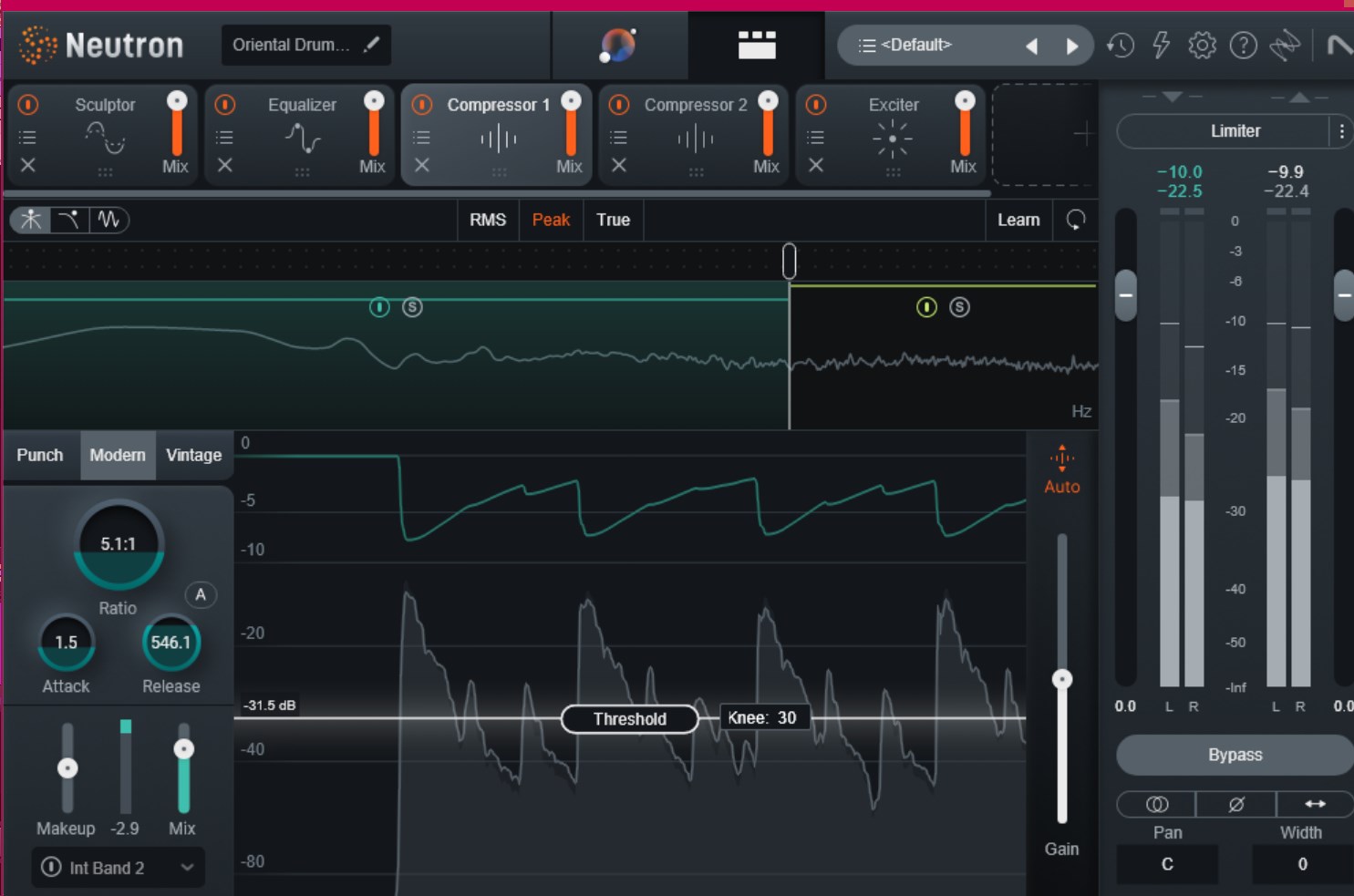
Neutron has been developed for many years, and its expanding feature set can make it demanding to master. With so many modules in one place, it also has the reassuring appeal of a tool that can cover almost everything.
smart:chain takes the opposite route. It focuses on the functions that matter most and commits to simplicity. Sonible already offers many separate plug-ins, so it could have built an all-in-one product like Neutron. That makes smart:chain feel aimed at a different kind of user.
Neutron: more oriented toward engineers
smart:chain: more oriented toward artists
That is roughly how their workflows feel to me.
smart:chain modules
smart:chain integrates these modules into one channel strip:
- EQ
- Compressor
- Auto Leveler
- De-Ess / De-Harsh
- Saturator
- Clipper
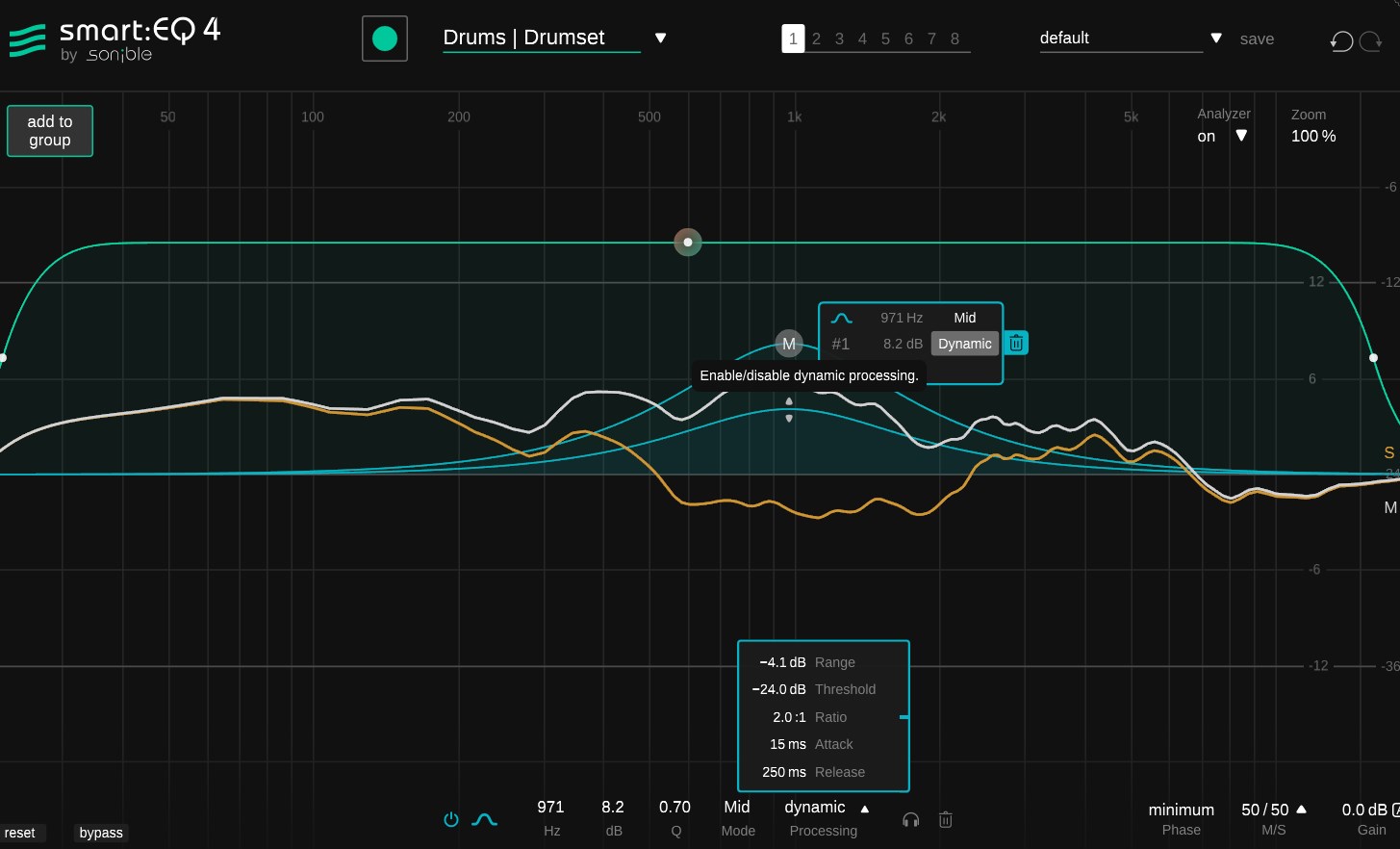
Sonible also releases the underlying processes as individual plug-ins, but the versions inside smart:chain offer a more limited feature set than their standalone counterparts.
If you need a particular type of processing, use the individual plug-in. If you want to finish channel-strip work quickly, smart:chain is enough. The choice depends on how deeply you want to refine the workflow.
For example, smart:chain’s EQ does not include the dynamic EQ or phase-processing functions found in smart:EQ.
Grouping
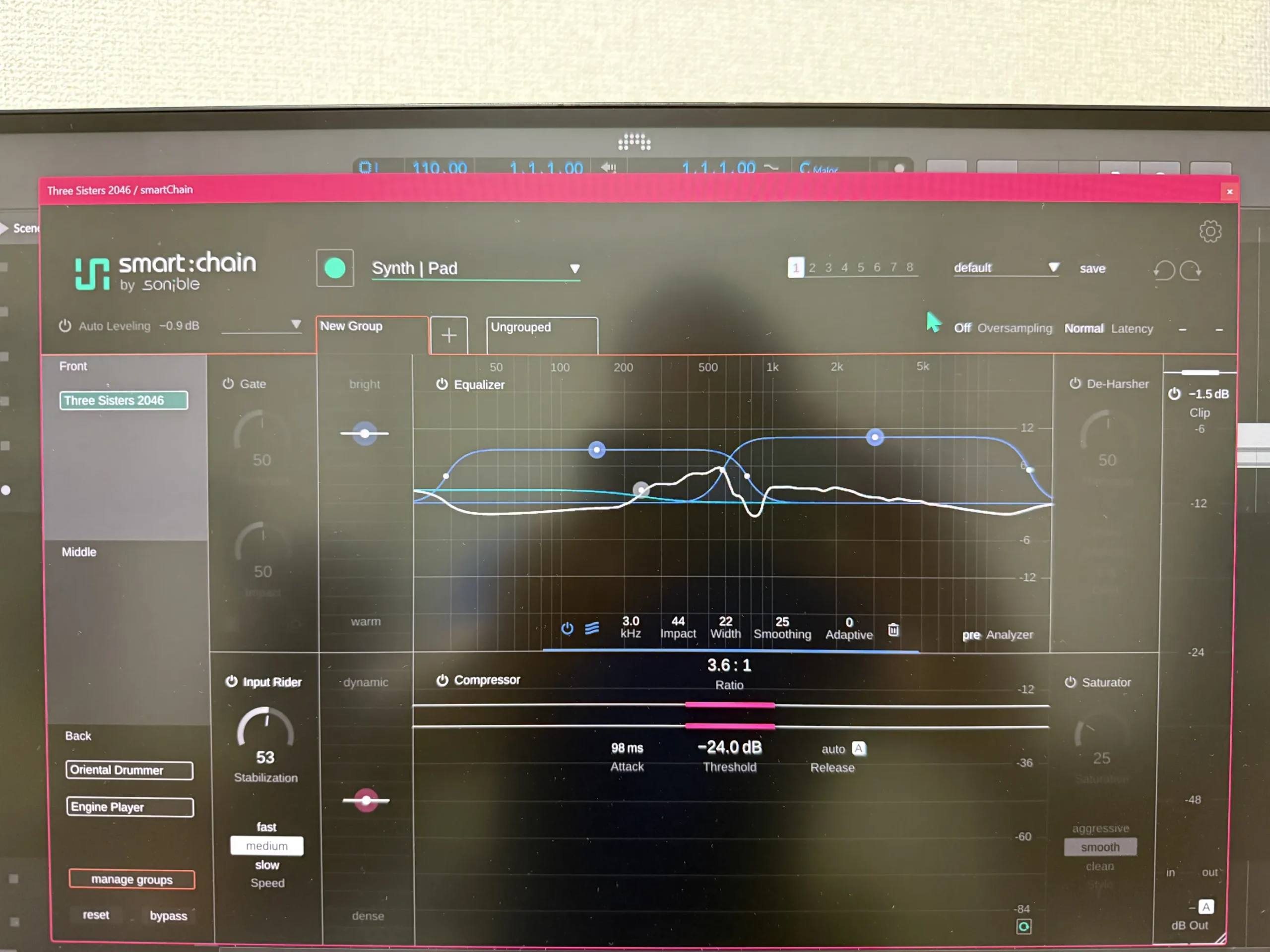
smart:chain lets you group the tracks on which it is inserted and work with them from a single screen. Not having to open and close every plug-in window may sound minor, but it is a genuine time-saving feature.
Dividing tracks into smart:chain groups makes each track’s processing easier to see and understand.
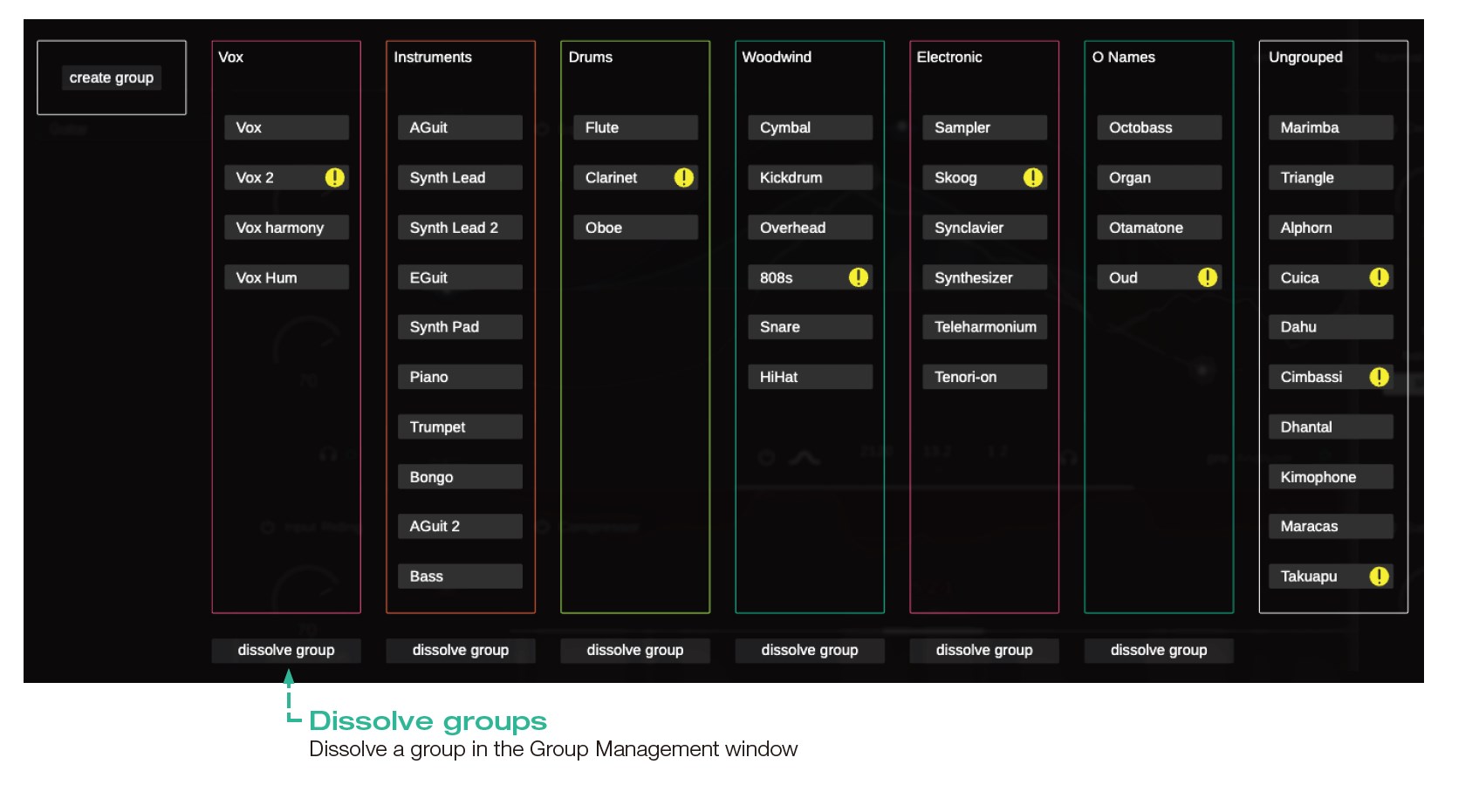
You can also arrange tracks into layers inside a group. Front, Middle, and Back assign tracks a front-to-back role. The change is not extreme, but it changes the way the effects work.
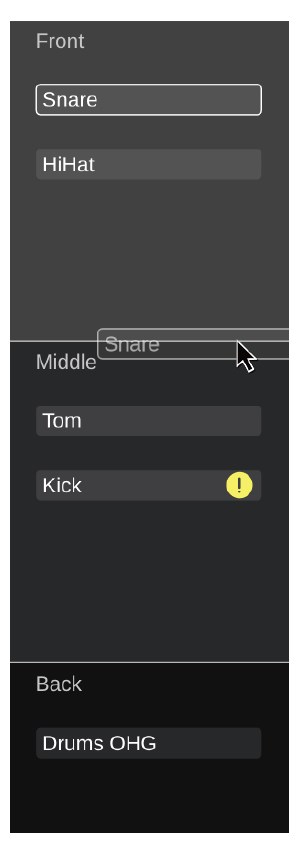
- Front: sources with presence, focus, and a direct, dynamic sound.
- Middle: sources placed in a balanced supporting position between lead and background elements.
- Back: softer, smoother, more restrained sources.
Layers are changed by drag and drop, which feels very intuitive.
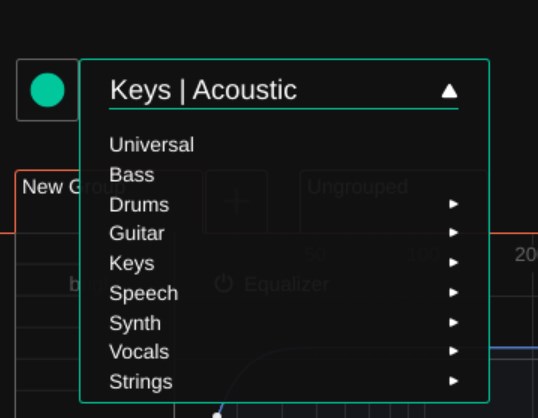
Choose a track profile and press the green RECORD button; smart:chain proposes starting values that suit the characteristics of the track.
With Neutron itself becoming considerably more expensive, smart:chain is an extremely useful option for people who own neither product.
Having AI propose the initial settings reduces the work of sound design and takes some pressure away. If you dislike the result or want a favorite plug-in to do a particular job, simply add that processing separately. Even placing smart:chain on every track and letting it create the first pass can save a great deal of time.
With sonible, you can save eight patterns and make A/B tests later with ease. That is another appealing part of the workflow.

Mix engineers who have developed their own detailed methods may find it somewhat limited. But for artists who would rather spend creative time on the music than on mixing, it is hard to imagine a more convenient and comfortable plug-in.
A 30-day trial is available, so try it for yourself first. If you do not authenticate an account on the sonible website, it operates as a trial.
Check the smart:chain sale now
Why stacking track processing can make the whole mix harder to see
Putting an EQ and compressor in a channel strip does not automatically make a mix coherent. The difficult part is the way each process affects the other tracks.
Brighten the vocal’s top end and it moves closer to the hi-hat and guitar. Reinforce the kick’s lows and the bass sub frequencies can get in the way. Raise a compressor’s make-up gain and something may seem better simply because it is louder, not because the processing improved it.
| What happens while mixing | Surface-level response | Likely problem |
|---|---|---|
| The vocal gets buried | Boost high frequencies and output level | The vocal moves forward but becomes hard on the ears |
| The guitar feels rough | Remove top end | Its outline disappears and it loses presence |
| The kick feels weak | Add low EQ and compression | It overlaps the bass and the low end swells |
| Noise is distracting | Apply a deep gate | Natural decay and the beginning of notes are cut off |
| A track sounds small | Restore output gain | Greater loudness is mistaken for better sound |
The psychoacoustic bias that makes louder material seem better also complicates mix decisions. Unless you compare before and after EQ or compression at matched levels, you cannot reliably separate a real improvement from a simple volume increase.
Even when every plug-in is behaving correctly on its own, the front-to-back relationships of the entire session may remain unresolved. smart:chain reconnects the accumulated individual processes and gives you a way to establish an overall reference point.
What does Sonible smart:chain bring together in one channel strip?
smart:chain is not merely a feature-rich channel strip. It analyzes audio once, then lets multiple processing modules operate from a shared understanding of that audio.
In a conventional plug-in chain, you insert EQ, compression, gating, and saturation in sequence and create a separate setup in each plug-in. In smart:chain, the shared characteristics of the sound provide an optimized starting point for each module. Every parameter remains editable, so you do not have to accept the AI analysis as a fixed preset.
| Process | Role inside smart:chain | Common manual burden |
|---|---|---|
| EQ | Organizes spectral balance and unwanted bias | Testing which frequencies to remove and retain takes time |
| Compression | Organizes level movement and peaks | Attack, release, ratio, and output must be judged together |
| Harshness reduction | Controls abrasive components only where needed | It is easy to remove too much top end and lose definition |
| Gate | Organizes silent sections and unwanted material | Deep settings can erase natural tails |
| Input-level tracking | Handles variation at the input | Clip- and phrase-level changes must be chased manually |
| Saturation | Adds harmonics and density | It can be hard to distinguish density from added loudness |
| Leveling | Organizes level relationships after processing | Bypass comparison and track-to-track balancing take time |
Existing plug-ins can reproduce the individual process types. smart:chain’s distinctive quality is that it shares audio context between modules and between multiple instances. It is designed not to add more processing, but to preserve the big picture that is easily lost as processors accumulate.
Use multiple instances to work with depth across the mix
Communication between multiple instances is central to smart:chain. The copies inserted on each track share information within the session, allowing you to treat individual tracks in relation to the whole mix.
Use Front, Middle, and Back layers to decide each track’s role
A mix’s front-to-back perspective is not determined by level alone. Brightness, dynamics, harmonics, decay, and separation from other tracks all matter at the same time. smart:chain places tracks in Front, Middle, or Back layers and applies processing that supports separation, clarity, and depth.
Place the vocal or snare in Front. Place chord guitars or synths in Middle. Place ambience or restrained pads in Back. Deciding roles first lets you think about the mix’s depth before reaching for the level faders.
A track in Front does not necessarily become louder. Processing that preserves the lead track’s outline combines with processing that organizes the frequency range and dynamics occupied by tracks behind it, creating perceived distance. If the result does not fit the production intent, revise the layer assignment and adjust the modules by hand.
Use Auto Leveling to create a starting point for a rough mix
smart:chain’s Auto Leveling analyzes learned relationships among tracks and creates an initial, genre-aware balance. It reduces the need to raise every fader one by one from silence and makes it easier to begin a rough mix quickly.
Auto Leveling does not decide the final fader balance. An automatic process cannot understand the song’s arrangement, the level at which lyrics should be heard, the impact needed for a drop, or intentional level differences used as production.
A practical approach is to create the basic relationships with Auto Leveling, use its dedicated trim to move them toward your taste, and finish the song’s expression with DAW faders and automation. Separating the foundation from the expression makes level decisions less uncertain.
Manage tracks and groups from one screen
The more tracks you process, the easier it becomes to forget which track was changed for which reason. smart:chain includes session control that gathers group management, movement between tracks, and access to each instance in one place.
Create groups for drums, vocals, guitars, and synths, and inspect them from one point of view while building the sonic foundation. Return to each track’s module for fine finishing. Reducing the number of times you change workspaces makes the flow of the mix less likely to break.
How smart:chain differs from traditional channel strips
Channel strips modeled on analog consoles are tools for choosing the character of EQ, compression, gating, and saturation. SSL-, Neve-, and API-style strips offer the pleasure of choosing a color associated with their circuitry and workflow.
smart:chain takes a different direction. It analyzes individual tracks and uses the relationship between multiple instances to establish starting points for processing and level.
| Comparison point | Typical analog-style channel strip | Sonible smart:chain |
|---|---|---|
| Main value | Circuit-derived tone, workflow, established processes | Connected analysis, initial settings, session-wide relationships |
| Processing approach | The producer sets each stage | The producer adjusts from the analysis result |
| Multiple-track workflow | Relationships are managed in the DAW and by ear | Uses communication between instances and centralized control |
| Best production stage | Finishing tone and adding character | Rough mixing, establishing a whole-mix reference, reducing repetition |
This does not mean smart:chain is better than analog-style channel strips. They start from different places in the mixing process. An analog-style strip may suit you when tonal color is the priority. smart:chain is useful when you want to organize multiple tracks and check the overall balance sooner.
A practical workflow for getting started with smart:chain
You do not need to insert smart:chain on every track at once. At first, use it on the tracks that form the song’s skeleton and see whether its approach fits your work.
- Choose tracks that define the impression of the song: vocal, kick, bass, main chords, snare, and so on.
- Insert smart:chain on those tracks and analyze the audio.
- Set broad Front, Middle, and Back roles. Starting with lead, support, and space makes the choices easier.
- Use Auto Leveling to create an initial balance and listen to the relationships before moving DAW faders.
- Check EQ, compression, harshness reduction, and gating one by one. Do not drive a module deeply if you cannot hear an improvement; disable it if necessary.
- Compare with bypass, focusing on vocal, kick, and bass. At matched loudness, judge whether the words, attack, low end, and decay improved.
- Finish section-by-section intensity with DAW automation. Add the song-specific production to smart:chain’s initial balance.
Applying it to every track on the first pass can make you spend all your time comparing analyses. Start with the song’s lead and foundation, then expand to detailed guitar, synth, and drum work once you understand the effect.
More processing is not always better. A vocal without distracting upper-mid harshness does not need deep harshness reduction. A quiet pad does not need aggressive gating. smart:chain can create a starting point quickly, but the decision whether to use each module remains yours.
Where it can speed up work by source type
Vocals
Home-recorded vocals often combine uneven input level, piercing consonants, room noise in silent sections, and the level balance required to make lyrics intelligible. When each process is inserted separately, later modules change level and texture, creating more situations where the initial setup has to be redone.
smart:chain suits sessions where you want to begin vocal preparation from one analysis. The emotion in the lyric, how much breath to leave, the acceptable amount of sibilance, and the relationship to double tracks cannot be decided by automation alone. The workflow works best when it shortens the first cleanup and leaves your ears free for the performance of the vocal.
Drums
With drums, the kick-to-snare perspective, abrasive cymbals, tom and room decay, and the overall level all interact. Deciding the roles of kick, snare, and drum bus before going into individual processing makes it less likely that you will add unnecessary compression or EQ.
Use smart:chain not to make the entire drum kit uniform, but to organize the lead attack and the components that should sit farther back. Genre-specific roughness, live feel, and pumping may need to be restored manually after processing.
Guitars and synths
Chordal guitars and synths can sound good alone while easily covering the vocal’s midrange. Organizing level and clarity while considering Front, Middle, and Back roles reveals a sense of distance that is harder to create by simply pulling down a fader.
Making distorted-guitar aggression, synth movement, and filter performance uniformly neat can reduce a song’s personality. Establish the overall reference with smart:chain, then leave the roughness and movement that the song needs. Deciding to undo processing is important too.
What smart:chain does not solve
Even an AI-assisted mixing tool cannot solve every problem in a song.
- The low end may clash because of the MIDI notes or note lengths of the kick and bass.
- The vocal may be buried because of the arrangement’s density or the melody’s range.
- The drums may feel weak because of sample selection or performance velocity.
- A chorus may lack lift because the roles do not change enough from section to section.
- The recording itself may contain significant noise, distortion, or room resonance.
smart:chain works with the material it receives and the relationships between tracks. There are limits to trying to repair, in the mix alone, problems that began in recording or arrangement.
If a mix never ends because of too many decisions and repetitive tasks, smart:chain can help. If the sound is not improving because the design of the song is the issue, returning to the stage before mixing is often faster.
Advantages and considerations
Advantages
- Start EQ, compression, harshness reduction, gating, input-level tracking, saturation, and leveling from a connected analysis.
- Communication between multiple instances makes it easier to inspect the whole mix, not just isolated tracks.
- Front, Middle, and Back layers provide a framework for thinking about depth roles.
- Auto Leveling creates an initial rough-mix balance and speeds the start of fader work.
- Every parameter remains editable after analysis, leaving room for the song’s intent.
Considerations
- It is not intended for accepting automatic analysis as the final mix.
- It does not solve arrangement, MIDI, sound selection, or recording-quality problems.
- Driving every module deeply without understanding its purpose can remove musical roughness and dynamics.
- People whose highest priority is the color of individual vintage hardware may prefer a different channel strip.
- If you already have a settled workflow with smart:EQ, smart:comp, or smart:gate, try the session-wide communication functions before deciding whether you need them.
Who is Sonible smart:chain for?
Sonible smart:chain is particularly well suited to people whose uncertainty grows in the early stages of mixing.
- You have added plug-ins since starting music production, but the order of the chain changes every time.
- You can tidy individual tracks but cannot settle the overall level balance.
- You spend so long on rough mixes that you never reach detailed automation or sound design.
- You want to describe the front-to-back relationships among vocals, drums, guitars, and synths more clearly.
- You want to use AI suggestions as a starting point while keeping the final decision yourself.
Conversely, if you make simple songs with only a few tracks and can process them confidently with your existing EQ and compression, there is no urgent need to add smart:chain. If you choose a channel strip mainly for tonal color, a product modeled on vintage circuitry may be more satisfying.
For people who want to reduce the number of mix decisions rather than merely the number of controls, Sonible smart:chain is a strong option for moving the production forward.
FAQ
Can beginners use Sonible smart:chain?
Yes. Beginners can use it while learning the order of EQ, compression, and gating. The important point is not to treat the analysis result as the correct answer. Compare before and after at matched loudness and listen for one reason at a time that the sound improved. Start with tracks whose role is easy to understand, such as vocal, kick, or bass.
Do I need smart:chain if I already own smart:EQ or smart:comp?
smart:EQ and smart:comp are useful when you want to work deeply on a particular process. smart:chain suits sessions where you want to handle multiple processes and the relationship between multiple tracks in one workflow. If your existing sonible plug-ins already complete your mix, use the trial to see whether Auto Leveling, Depth Staging, and centralized control matter to you.
Can smart:chain complete a mix by itself?
Not necessarily. Level expression, section-by-section movement, spatial effects, mastering, and final listening are separate stages. smart:chain is strongest when used to speed up cleanup and the start of a rough mix.
How should I decide between Front, Middle, and Back layers?
Begin by placing a song’s focal sound, such as the vocal or snare, in Front; chord instruments and the main rhythm in Middle; and pads or ambience that support the space in Back. The right answer changes with genre and production intent. In songs where the lead role changes between verses and choruses, use DAW automation to create the distance required by each section.
Where is the smart:chain manual?
manual-smartchain.pdf is included with the smart:chain installer.
Conclusion
Sonible smart:chain is not just a channel strip that puts EQ, compression, and gating on one screen. It passes common audio analysis to multiple processes and, while looking at the levels and depth of multiple tracks, creates a starting point for a mix.
It can help people who lose sight of the whole mix as they stack track processing, spend all their time on a rough mix, or dive into detailed EQ before settling the level balance. It is a prompt to put the order of work back into shape.
On the first song, try smart:chain only on the vocal, kick, bass, and main chords. Treat the analysis as a starting point, keep only the processing you need, and decide the song’s expression with your own ears. The mix decisions become more organized, and time returns for sound creation.
Check the smart:chain sale now
Owners of a sonible smart-series product can crossgrade.
View the smart:chain crossgrade sale >>
Past sale history
September 1–28, 2026: smart:chain 45% off
¥30,980 → ¥16,980 (prices may change with exchange rates)