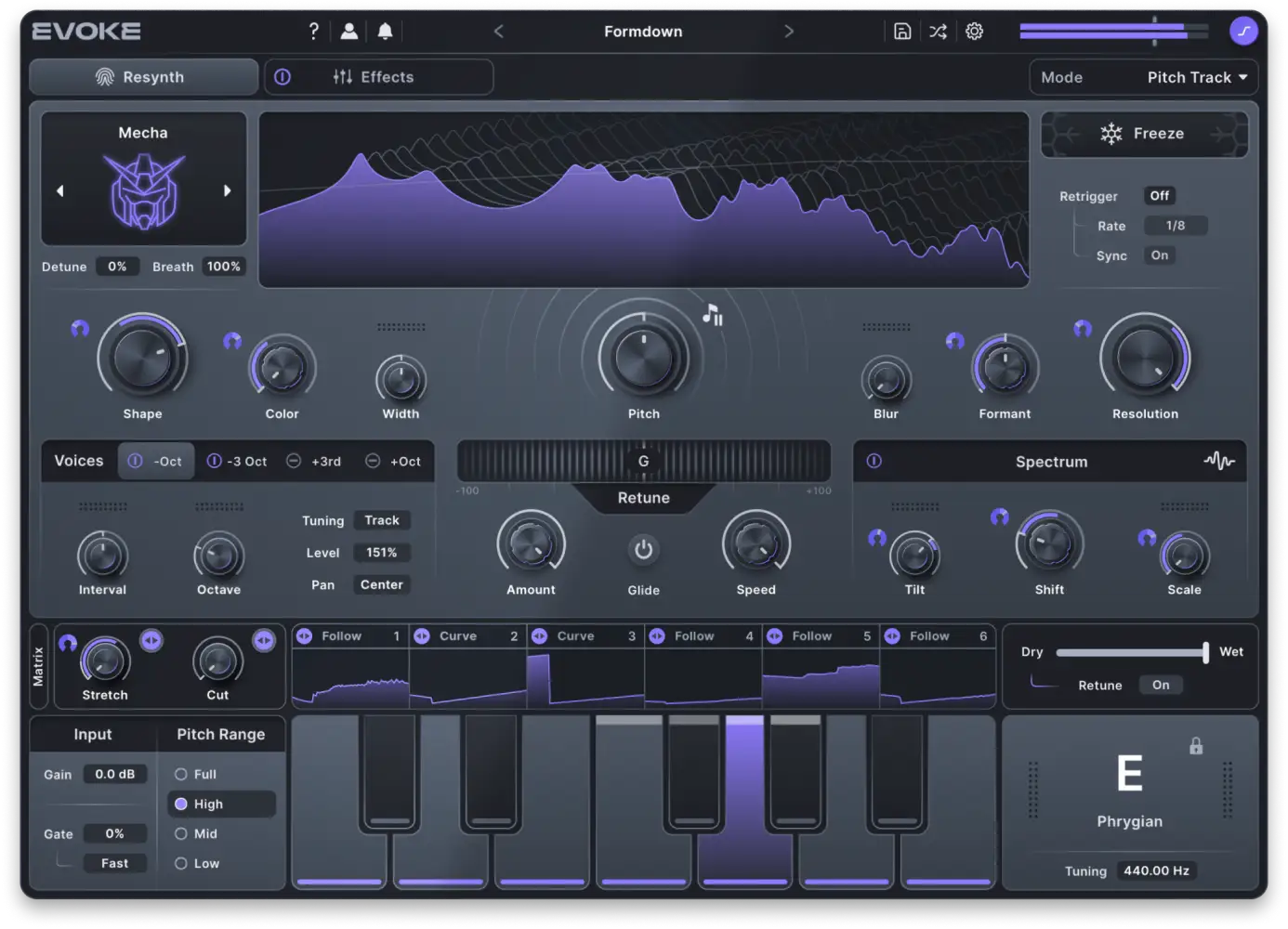
Minimal Audio keeps releasing effects that spark new ideas during production. Evoke is a vocal synthesizer for taking the mechanical, electronic vocal lines often heard in EDM and pushing them further, with a much bolder range of expression.
When you are working inside a DAW, it is easy to wish for a faster way to make a vocal sound more striking without losing creative control. Minimal Audio Evoke is built for exactly that kind of moment.
Released in October 2025, Evoke is a vocal-effects plug-in based on vocal resynthesis. Instead of merely correcting pitch or applying a conventional vocoder treatment, Evoke analyzes and reconstructs the incoming voice, then lets you reshape pitch, tone, harmony, movement, and effects into a new vocal sound.
Evoke feels like a more fully developed direction for the creative robotic and synthesized-vocal sound associated with processors such as Baby Audio Humanoid. Retuning, harmony generation, synth-voice processing, and a multi-effects rack all live in one plug-in.
What is Minimal Audio Evoke?
Minimal Audio Evoke is a vocal plug-in for VST, AU, and AAX hosts on macOS and Windows. The main idea is very different from a conventional pitch-correction plug-in or basic vocoder.
Evoke takes an incoming vocal through spectral analysis and vocal modeling, then reconstructs the signal into a new sound. The result is less about correcting the original voice and more about creating a new voice from it.
Combining a synth engine with a vocal creates a more individual sound
Evoke does not simply adjust the original vocal. The resynthesis engine creates a new vocalized sound that can remain clear and expressive while moving far beyond the tone of the original performance.
The first striking point is the response speed. Insert Evoke on a vocal track and it can quickly add harmonies and layers. MIDI input and sidechain support also make it possible to synchronize the vocal with an external melody and explore vocoder-like approaches.
Evoke works for beginners who want to widen their vocal-processing palette and for experienced producers who want deeper control over a vocal sound.
Minimal Audio Evoke review
| Overall rating | 5 / 5 |
|---|---|
| Strengths | A vocal synthesizer for detailed vocal sound design; an advanced modulation system derived from Current; more than 300 presets |
| Limitations | The modulation section can feel demanding without basic synth knowledge; processing can be moderately CPU-intensive |
Why choose Minimal Audio Evoke?
The defining feature is the resynthesis engine. Traditional vocoders often rely on envelope followers and filter banks. Evoke uses spectral analysis to rebuild the vocal, aiming for a clearer and more expressive result.
Formant filtering makes it possible to shift the tone while retaining aspects of the performance. A low rap-style vocal can become a high, pop-oriented voice, for example. The transformation is fast enough to support experimentation rather than interrupting the writing process.
The modulation system is a major part of the appeal
Evoke includes a modulation system derived from Minimal Audio’s flagship synth, Current, and its effect design. LFOs, curve sequencers, and envelope followers can move parameters over time.
Parameter movement adds motion to the sound and can affect the groove of a vocal phrase. A vocal texture can evolve with the rhythm of the track instead of staying fixed for an entire section.
The effects rack contains eight studio-grade effect types and can load them into up to 12 freely assignable slots. Loaded effects can be reordered, swapped, or removed.
- Chorus
- Compressor
- Delay
- Distortion
- Equalizer
- Filter
- Reverb
- Shifter
The combination turns Evoke into more than a vocal processor. The effects section can also function as a flexible multi-effect environment for building a finished vocal texture inside one plug-in.
A practical example: adding harmonies in a few steps
Here is a simple approach for adding harmony to a pop lead vocal.
- Insert Minimal Audio Evoke on the vocal track in your DAW.
- In the Resynthesis section, select a harmony-oriented algorithm or preset.
- Enter third or fifth harmony notes through MIDI.
- Raise the Formant control slightly for a brighter tone, then add space with Delay.
- Blend the processed output with the original lead vocal.
One vocal take can become a rich chorus layer. Begin by stacking three vocal layers, then judge the balance in the context of the entire mix.
Synthesis modes
The core engine uses sound models that establish the direction of the generated vocal. Each model is illustrated with a motif that represents its sonic identity.
Categories
- Natural: Produces organic results that complement a human voice.
- Synthetic: Emphasizes modern synthetic timbres with complex frequency spectra.
- Texture: Creates non-pitched sounds such as noise, static, and liquid-like textures.
Character models
Evoke includes multiple character models for moving beyond a single vocal-synth texture.
| Character model | Sound direction |
|---|---|
| Unison | Adds thickness by layering slightly detuned copies of the voice. |
| Contour | Creates a woody, organic sound reminiscent of bowed strings. |
| Poly-Sync | Uses hard-sync behavior to generate rich harmonics. |
| Harmonic | Produces chord-like effects based on the harmonic series. |
| Droid | Creates futuristic digital timbres through spectral processing. |
| Corrupt | Simulates damaged digital audio with unstable, glitchy behavior. |
| Liquid | Delivers a wet, flowing sound with changing textural motion. |
| Data | Creates digital textures reminiscent of a futuristic user interface. |
| Choral | Emulates a small vocal ensemble for rich harmonic texture. |
| Oracle | Builds resonant overtones for a deeper harmonic effect. |
| Pulsar | Layers and disperses multiple oscillators for complex overtones. |
| Vocoid | Reimagines classic vocoder and talkbox sounds in a modern form. |
| Mecha | Produces resonant robotic sounds reminiscent of science-fiction film dialogue. |
| Static | Uses a noise-based sound with variable crackle and digital-noise effects. |
| Alloy | Adds a metallic, spectral sound with harmonic shifting and rich feedback. |
Macro control
Evoke also includes macro controls that move several synth parameters at the same time. After loading a preset, start by moving the macro knobs up and down. The macro names can be defined for each preset, so the labels change according to the selected sound.
The overall effects amount is controlled with the Dry/Wet balance in the lower-right area of the interface. A setting of Wet 100% outputs only the processed signal.
Effects and CPU load
The effects page is where you configure the processing rack. The effect design shares ideas with the effects used in Minimal Audio Current, giving Evoke a broad palette that reaches well beyond simple pitch processing.
Evoke can use more processing power than a basic pitch effect because pitch work and multiple effects may operate at the same time. Plan track freezing or rendering when a project uses several complex Evoke instances.
How Evoke compares with similar vocal tools
Evoke shares territory with products such as iZotope VocalSynth 2, Antares Auto-Tune, and Waves Tune Real-Time, but the core jobs differ.
| Item | Minimal Audio Evoke | iZotope VocalSynth 2 | Antares Auto-Tune | Waves Tune Real-Time |
|---|---|---|---|---|
| Main function | Resynthesis, creative effects, and modulation | Vocoder and harmony processing with many presets | Pitch correction | Real-time pitch correction |
| Distinct strength | Clear signal generation with practical MIDI and sidechain interaction | A large library of creative presets | Professional natural correction | Low-latency use suited to live work |
| Main trade-off | Deep customization requires synth knowledge | Can require more complex routing | Can become robotic when pushed hard | A narrower creative range |
| Best fit | Producers who want to transform the vocal into a new instrument | Producers who want quick preset-led vocal effects | Producers who need pitch correction as the primary goal | Producers who need simple, immediate correction |
The resynthesis approach gives Evoke unusually strong transformation potential. Many pitch tools are adjustment-focused. Evoke is designed for creative vocal transformation.
Comparison with Baby Audio Humanoid
Baby Audio Humanoid is another important vocal-synth option. Humanoid has a lower barrier to entry and is easy to use for quick robotic or synth-voice effects. Its large set of wave-table options, pitch tracking, MIDI tracking, and polished effects make synthesized vocal production much easier to approach.
Evoke also includes many presets, so getting started is not difficult. The difference appears when you begin to build a sound from scratch. Evoke exposes more synth-oriented terminology and more parameters, so learning the instrument takes time. The reward is a much wider design space, including a deeper modulation system and an effect rack comparable to a synth environment.
Preset browser
The preset browser is refined and easy to navigate. Tag-based searching makes it faster to find a starting point, which matters when the plug-in offers a large range of vocal directions.
Conclusion: update your vocal sound with Minimal Audio Evoke
Minimal Audio Evoke is not merely another vocal effect. The combination of resynthesis, modulation, character models, MIDI interaction, and effects turns a vocal into a flexible sound-design source.
The plug-in is especially effective for EDM, pop, and electronic production where a lead vocal needs to stand out or where the vocal itself needs to become part of the synth arrangement. Start from a preset, move the macros, then use the modulation and effect sections to steer the result toward a more personal sound.