You have written the melody, programmed a working arrangement, and even made a reasonable scratch vocal. Yet the chorus still refuses to reveal its real size. The vocal feels out of range, the timbre does not belong to the track, and you hesitate to add doubles or harmonies before the lead part is settled.
That situation is common in songwriting. It is difficult to make a final arrangement decision while the vocal that carries the song is still only a placeholder.
AI voice conversion is not a substitute for a singer, and it does not turn an unfinished performance into a finished song by magic. A well-chosen voice model can, however, let a producer test the song with a vocal character that is closer to the intended destination. IK Multimedia ReSing MAX is built for that stage of the process.
ReSing MAX converts a recorded vocal or instrument performance into a selected model while preserving the performance’s musical shape. The software offers a practical way to test vocal color, range, layers, and arrangement decisions before booking a vocalist or committing to detailed production work.
This article explains how ReSing MAX fits into a songwriting workflow, where it genuinely helps, and where a producer still needs judgment.
The conclusion: ReSing MAX is not about replacing a singer. It is about reaching better decisions earlier.
| Production roadblock | What ReSing MAX can help you test | A better production decision |
|---|---|---|
| A scratch vocal has the wrong range or tone, so the key and chorus remain undecided | Use voice models, Transpose, and Character to audition the song in a more suitable range and vocal color | Decide whether the key, melody, backing parts, and chorus register really work |
| Doubles and harmonies remain unfinished because the lead vocal is not convincing yet | Convert recorded guide parts into different roles and build a rough vocal stack | Judge the density, width, and emotional lift of the chorus before final recording |
| The scratch vocal does not match the genre or emotional target | Blend two model directions with Fusion and alter the delivery with Character settings | Test whether the track needs a pop, electronic, intimate, or more assertive vocal identity |
The main value is not the novelty of changing a voice. The real value is hearing a more believable version of the vocal part while arrangement choices can still be changed easily.
ReSing MAX sale >>
ReSing MAX Upgrade sale >>
What is IK Multimedia ReSing MAX?
IK Multimedia ReSing is a voice and instrument conversion application. A producer supplies an audio performance, chooses a target model, adjusts the result, and renders an audio output. ReSing can operate as a standalone application, as a plug-in workflow, and in compatible ARA-based DAW environments.
The MAX edition expands the available model library and user-model capacity. It includes 25 voice models, 25 instrument models, and 25 user-model slots. The larger model collection matters when a production needs several vocal roles, different tonal directions, or repeated experiments across more than one project.
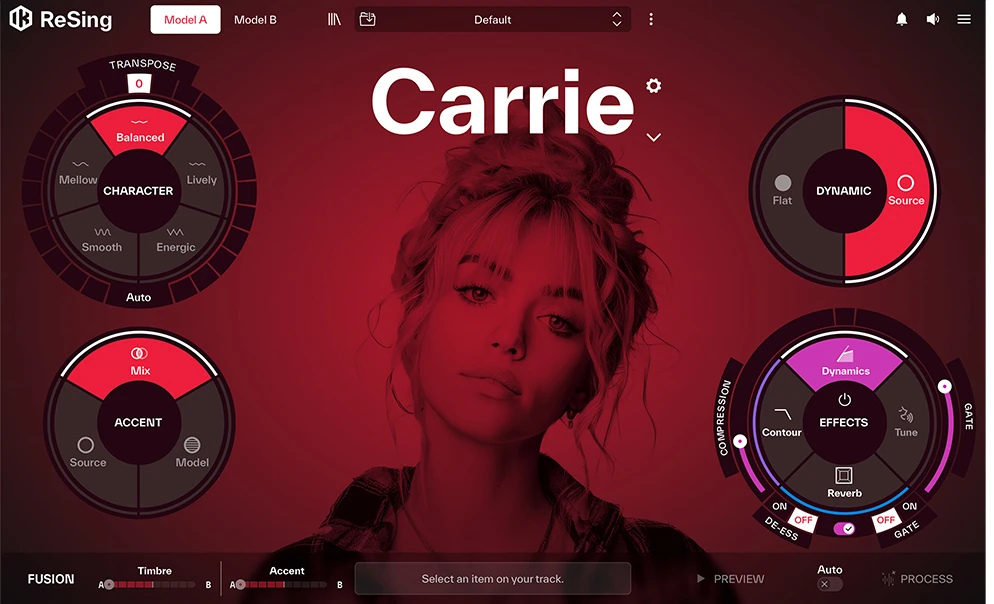
The interface is designed for performance transformation rather than traditional note-by-note vocal synthesis. You record or import a guide, choose a voice or instrument model, then shape the result with controls such as Character, Transpose, Accent, and Fusion.
ReSing MAX works best when a producer treats the converted output as a musical draft with a purpose: test the key, choose the song’s emotional direction, create a believable harmony texture, or identify where the underlying performance needs improvement.
Why a song can stall at the scratch-vocal stage
A melody can be correct but still be difficult to sing
A MIDI melody can look perfect and still create problems once it is sung. A leap may feel too exposed, a phrase may require more breath than expected, or the chorus may sit in a range that no longer feels comfortable after several takes.
ReSing MAX lets a producer place the same guide performance into a different vocal range and character. Transpose provides up to 12 semitones of adjustment, while Auto can help select a model-friendly range. The result is not proof that any key will work for every singer. It is a faster way to discover whether the current key and melodic register support the intended vocal role.
Vocal tone changes the arrangement decisions around it
The same melody can create entirely different arrangement needs when performed by a close, intimate voice, a bright pop voice, a powerful rock-leaning voice, or a smooth electronic voice. A guitar part that feels perfect beside one vocal timbre can sound crowded beside another. A hi-hat pattern may need more air. A synth pad may suddenly become too dense.
Fusion makes that comparison more direct. The feature blends Model A and Model B, allowing a producer to combine vocal tone and accent directions. A main model can provide the desired timbre while a second model contributes a different delivery or attitude. The process is useful for testing the role of the vocal in the mix rather than searching endlessly for a single perfect preset.
Delaying doubles and harmonies hides the real size of the chorus
Songwriters often postpone vocal production because the main vocal has not been finalized. The delay is understandable, but it can hide a basic problem: the chorus may only feel complete once the backing vocals, doubles, and call-and-response parts are present.
ReSing MAX can convert a recorded harmony or double into another model and help a producer hear a more finished vocal arrangement earlier. The technique does not replace the final singer’s performance. It does reveal whether the harmony count, vocal placement, and chorus density are moving in the right direction.
The main ReSing MAX features that affect real production decisions
25 voice models, 25 instrument models, and 25 user-model slots
The MAX edition provides a broad set of voice and instrument models, plus space for 25 user-created models. The model count is useful because a track rarely needs only one answer. A songwriter may want to compare a soft male lead with a brighter female lead, create a different harmonic role, or test an instrument performance as a new texture.
Instrument models convert a musical performance into a new instrumental character. A played or programmed musical idea can become part of a different sound-design direction without rebuilding the arrangement from zero. The result can support demos, electronic production, and projects where an unfamiliar texture helps reveal a better arrangement choice.
The number of models alone is not the reason to buy a conversion tool. The advantage is the ability to make comparisons in the context of the same song.
Fusion for combining vocal tone and accent
Fusion combines Model A and Model B. Timbre controls the tonal direction of the voice, while Accent adjusts the emphasis and performance-like character of the second direction.
One useful approach is to choose a model that has an appropriate vocal color, then bring in a second model only for a more energetic, softer, or stylistically different accent. A singer may not need to be pushed toward an extreme interpretation. A small blend can be enough to reveal whether the chorus needs more edge or whether the arrangement needs to leave more room for the lead part.
Fusion is most useful when it serves a clear question. “Does the chorus need more aggression?” and “Would a smoother delivery make the lyric more believable?” are better questions than browsing through every combination without a target.
Character and Transpose for fitting the vocal to the song
Character includes options such as Balanced, Lively, Energetic, Smooth, and Mellow. The available options provide a practical way to shift the delivery without changing the core guide performance.
The control is particularly useful after the song’s basic vocal role is known. An energetic pop chorus can require a more assertive delivery, while a ballad or ambient section may benefit from a smoother or mellower character. Character should not become a substitute for correcting pitch, rhythm, phrasing, or lyric stress in the guide. A cleaner guide performance creates a better starting point for every model.
Transpose helps align the converted result with the song’s key and vocal register. Use the two controls together: settle the pitch range first, then choose the character that supports the emotional role of the part.
Standalone, plug-in, and ARA-based workflows
ReSing MAX can be used in a standalone workflow, through plug-in workflows, and in DAWs that support compatible ARA integration. The available integration can make it easier to send an audio performance into ReSing, adjust the conversion, and return the rendered result to the project.
DAW compatibility deserves a practical test before a producer commits to a major workflow change. ReSing Free provides a way to check whether project transfer, timing, render behavior, and export steps fit the DAW already used for production. A reliable workflow is more valuable than an impressive feature list that adds friction at the final stage.
A five-step workflow for using ReSing MAX in a real song
- Record the cleanest guide vocal you can manage Aim for intelligible lyrics, stable rhythm, and a performance that reflects the intended phrasing. Perfect singing is not required, but a severely out-of-tune or rhythmically unstable guide creates less useful conversion material. A clear performance gives ReSing MAX a stronger musical foundation.
- Choose the main model according to the role in the arrangement Start with the role: close verse lead, open chorus lead, low harmony, bright double, or an electronic vocal texture. Select models because they serve that role, not because every model needs to be auditioned. Comparing a limited number of purposeful choices is faster and more revealing.
- Use Character and Transpose to settle the key and register Check whether the singer’s placement feels natural inside the track. If the chorus feels high, do not begin by rebuilding the entire arrangement. First test whether a more suitable range and a different Character setting solve the listening problem. The experiment can reveal whether the real issue is the key, the melody, the guide, or the arrangement around the vocal.
- Use Fusion to test a more specific vocal identity A single model can establish the basic direction. Fusion can add another accent or tonal trait when the part needs more individuality. Adjust timbre and accent with a production question in mind, then compare the result against the full track rather than in solo.
- Return the processed audio to the DAW and judge the full song Do not evaluate the converted vocal only in isolation. Listen from verse to chorus, then listen again with doubles, harmonies, drums, bass, and the main accompaniment. A conversion is useful only when it helps the next musical decision: change the key, simplify the backing, add a harmony, change the chorus dynamics, or prepare a clearer brief for the final vocalist.
Three practical production scenarios
1. A songwriter needs to choose a usable key before the final session
An independent songwriter may have a melody that works on paper but does not sit comfortably in their own voice. Instead of assuming the melody is wrong, record a guide, test several suitable voice models, and compare the chorus in nearby keys.
The experiment can expose whether the song needs a key change, a rewritten leap, a simpler phrase, or more breathing space. ReSing MAX provides a decision-making environment; it does not remove the need to revise the composition when the composition is the actual problem.
2. A singer-songwriter wants to compare vocal identities before committing to an arrangement
When a vocal tone changes, the entire arrangement may need to change with it. A warmer model can leave room for a more intimate production. A more powerful model can expose a need for a wider chorus, stronger drums, or reduced guitar density.
Use ReSing MAX to compare the tonal relationship between the vocal and the arrangement. Avoid making final mixing choices from isolated model auditions. The useful comparison happens inside the full musical context.
3. An EDM or electronic track needs vocal material as texture, not only as lyrics
Electronic production often uses vocal movement as part of the sound design. A recorded phrase can become a processed vocal layer, then move through pitch, Character, and layered mix treatment to create a break, build-up, or response texture.
ReSing MAX can turn a familiar performance into new material without asking the producer to rebuild the entire phrase from zero. The technique is especially useful when a track needs a human-like contour but not a conventional lead-vocal presentation.
Mistakes that reduce the value of ReSing MAX
Expecting a poor source performance to become a finished vocal automatically
ReSing MAX can transform tone and presentation, but it cannot fully solve an unclear lyric, poor rhythm, awkward breath placement, or a performance that lacks the intended emotional shape. Repair or re-record the guide when fundamental musical problems are present.
Before changing models, check timing, pitch, and phrasing. A more stable guide will make every conversion more meaningful.
Browsing models without a production question
Twenty-five voice models can create a new kind of indecision. “Which voice is the best?” is not a useful starting question. Better questions are: “Does the verse need less weight?” “Does the chorus need a stronger lead?” “Would a brighter double create enough separation?”
Model selection becomes faster when each audition is linked to an arrangement decision. ReSing MAX helps a producer compare possibilities; a clear purpose determines which possibility belongs in the song.
Assuming DAW integration will be identical in every setup
Standalone, plug-in, and ARA-oriented workflows can be useful, but the practical result depends on the DAW, operating system, project format, and the producer’s preferred render path. Test the workflow with ReSing Free before relying on the software for a deadline-critical project.
Advantages and limitations
Advantages of ReSing MAX
- Converts a guide performance into a different vocal or instrumental character, helping producers test key, range, and arrangement choices faster
- Includes 25 voice models, 25 instrument models, and 25 user-model slots for broader comparison across projects
- Fusion, Character, and Transpose provide useful ways to shape vocal tone and delivery toward the song’s target
- Supports standalone, plug-in, and compatible ARA-based production workflows
- Helps build more informative demos, backing-vocal sketches, and sound-design layers before final recording
Limitations of ReSing MAX
- A weak source performance remains a weak starting point; timing, pitch, lyric clarity, and phrasing still matter
- A larger model library can slow decisions when a producer auditions models without a defined role
- DAW integration and transfer behavior should be checked in the actual production environment
- A converted guide does not replace the musical judgment, permission, and performance direction required for a finished commercial vocal
ReSing MAX is not a button that turns every guide into a release-ready lead vocal. ReSing MAX is a way to make the song’s direction more audible before expensive or time-consuming decisions become fixed.
FAQ
Can ReSing MAX solve a lack of singing ability?
ReSing MAX can help a producer create a more useful demo and test vocal direction, but it does not correct every musical issue by itself. A guide with clearer timing, pitch, breathing, and phrasing produces more valuable results. The software is best used to support songwriting, arrangement decisions, and communication with a final singer.
What is the difference between ReSing and ReSing MAX?
ReSing MAX includes 25 voice models, 25 instrument models, and 25 user-model slots. Producers who want a compact entry point or only need a limited number of models may find another edition sufficient. MAX is designed for broader model selection, more recurring production use, and greater user-model capacity.
Can I make a model from my own voice?
ReSing supports user-model creation. Creating and using any model requires appropriate consent and rights for the voice material involved. Treat voice data, session agreements, and permissions with the same care used for any other recorded performance.
Which DAWs can I use with ReSing MAX?
The application supports standalone and plug-in workflows, plus compatible ARA integration. The best approach is to test the full workflow in your own DAW with ReSing Free before choosing the MAX edition, especially when project transfer and fast rendering are essential.
Who should consider ReSing MAX?
ReSing MAX suits producers who need a clearer vocal direction before the final recording stage: songwriters whose scratch vocals stop them from judging the song, producers comparing vocal color and range, creators who want to build backing-vocal sketches earlier, and electronic artists who need voice conversion as part of sound design.
The software is less useful for anyone expecting a fully automatic answer to performance, composition, and mixing problems. First identify the decision that is blocked. Then use voice conversion to make that decision audible.
For producers who regularly need to test keys, voice roles, vocal colors, AI-assisted instrument transformations, or larger model combinations, ReSing MAX can become a practical part of the creative workflow.