A clap can be the smallest sound in an arrangement and still be the reason a chorus feels alive.
The problem is familiar: drag one good clap sample onto beats two and four, turn it up, and the part still feels like a metronomic sample pasted over the song. The attack repeats too perfectly. The stereo image never changes. Adding reverb makes it wider, but not more human.
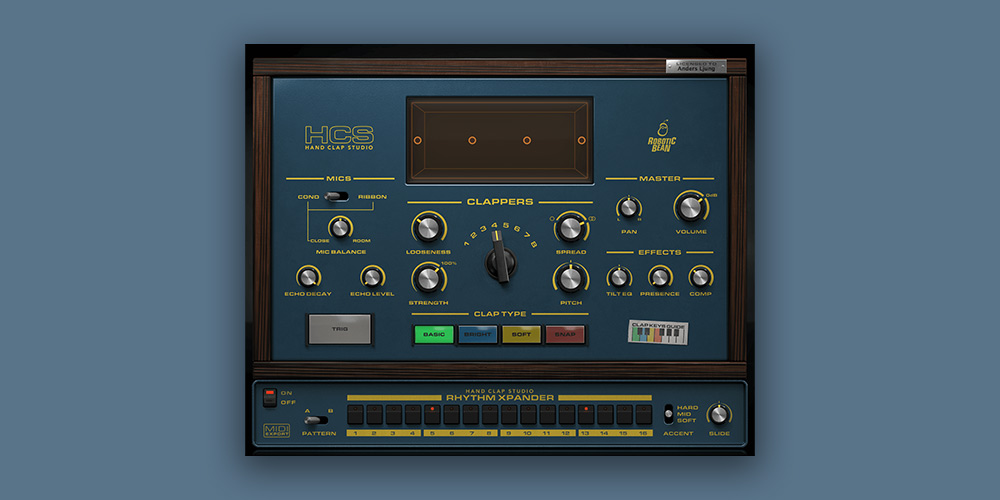
Robotic Bean’s Hand Clap Studio approaches the problem from a more useful angle. It is not an electronic-clap machine and it is not a generic sample browser. It is a dedicated sampled instrument for building handclaps and finger snaps with control over the number of people, timing variation, stereo placement, microphone perspective, and rhythm.
The result is not merely a louder clap. It is a clap part with a believable role in the arrangement.
The real reason a single clap sample sounds small
Most weak clap parts are not weak because the sample itself is bad. They are weak because one sample is being asked to imitate several changing events at once.
In a real group clap, people do not strike at exactly the same millisecond. Their positions are different, their individual attacks are slightly different, and the room reaches the microphones at different times. A one-shot loop can capture a nice tone, but it cannot easily change the behavior of the clap across a song.
That distinction matters in an arrangement. A close single clap can support an intimate verse. A wider, looser group clap can make a chorus feel communal. A finger snap can create momentum without filling the same frequency range as a snare. Treating all three jobs as one copied sample is where the part starts to feel artificial.
Hand Clap Studio gives those decisions their own controls. Instead of piling on duplicate samples and hoping the result works, you begin with the musical role and build the group around it.
What Hand Clap Studio is
Hand Clap Studio is a sample-based virtual instrument dedicated to recorded handclaps and finger snaps. The library was recorded at Atlantis Studio in Stockholm, with claps performed by percussionist Pelle Jacobsson. It contains more than 700 samples with multiple velocity layers and round robins, which helps repeated notes avoid the exact same playback each time.
Four sound types cover the core palette:
| Sound type | Character | A useful starting role |
|---|---|---|
| Basic | Standard handclap | Pop, indie, rock, and general backbeat support |
| Bright | A sharper three-finger flamenco-style clap | Choruses that need a clearer cut through guitars or synths |
| Soft | A cupped-hand clap with a rounder tone | Acoustic tracks, ballads, and restrained verses |
| Snap | Finger snap | R&B, neo-soul, acoustic pop, and quieter rhythmic movement |
The sound selection is intentionally focused. The value is not having hundreds of unrelated percussion patches. The value is being able to turn a basic handclap into a part that sounds like one person near the listener, a few people around a drum kit, or a wider group further back in the room.
The controls that make a clap part feel human
Start with the number of clappers
The Clappers control sets the virtual group from one to eight people. This is the first control I would reach for because it changes the musical identity of the part before any EQ or reverb is involved.
One clapper is useful when a part needs to stay close, dry, and personal. Two or three clappers can add a natural pop accent without turning the chorus into a crowd. Five to eight clappers create the density needed for a bigger hook, a club-ready build, or a gospel-influenced lift.
Increasing the count does more than add volume. More people change the density of the transient, the sense of width, and the amount of natural variation surrounding the beat. That is why an eight-person clap can feel more convincing than one clap sample duplicated eight times.
Let the rhythm breathe with Looseness
The Looseness control introduces statistical timing variation between performers. One of the central clappers remains on the beat while the surrounding claps can arrive later. The amount is scaled with tempo, so a fast song does not receive an exaggerated delay just because the same control setting is used.
This is a small detail with a large arranging consequence. Perfectly aligned layered claps can be powerful, but they often sound like one sample multiplied. A moderate amount of looseness makes a group feel like people responding together rather than a single transient being copied across the stereo field.
For tight modern pop, begin low and increase it only until the attack stops sounding stamped. For house, disco, acoustic pop, or a chorus that needs a little lift, a more relaxed setting can add motion without changing the written pattern. For a deliberately messy party or live-room feel, combine higher Looseness with more clappers and a wider spread.
Put the group in a stereo space
Spread determines how the clappers occupy the stereo field. It is not simply a conventional width knob. At lower values the group is more concentrated; at higher values the individual clappers occupy a broader left-to-right image.
Use a narrow spread when the clap needs to reinforce the center with the snare. Use a broader setting when the clap should become a chorus layer around the vocal. A wide group can be especially useful after a dense chorus arrives: the vocal stays in the middle while the claps announce the section change at the sides.
The practical advantage is control at the source. You are deciding where the people are before adding stereo tricks that can blur the transient or introduce an artificial sense of width.
Build depth with microphones before adding plug-ins
Hand Clap Studio offers more than a dry sample with an effect slot. Its microphone section lets you balance close, room, and echo-chamber perspectives.
The close microphone can be switched between a condenser and a ribbon option. The ribbon choice has a softer attack and less treble, which gives a useful alternative when a bright clap is fighting cymbals or vocal consonants. The close/room balance behaves much like a dry/wet decision: move toward close for definition, or toward room for a more distant ensemble feel.
An additional sampled echo chamber can be blended in, and its decay can be shortened. This makes it possible to create a broad, characteristic tail without immediately reaching for a separate reverb plug-in.
Here is a reliable way to set the perspective:
- Choose the clap type and clapper count first.
- Start close enough to hear the transient clearly.
- Add room until the group belongs to the track rather than sitting on top of it.
- Blend the echo chamber only when the part needs a recognizable tail or a larger sense of scale.
- Re-check the snare. A clap that sounds impressive alone can crowd the backbeat when the full drum bus returns.
The goal is not maximum ambience. The goal is choosing the distance that gives the clap a purpose.
A practical tone-shaping section for fast decisions
The instrument includes a small effects section with Tilt EQ, Presence, and compression. The controls are simple, but they are well chosen for the task.
Tilt EQ brightens or darkens the overall sound. Use it before reaching for detailed DAW EQ work: a dark acoustic arrangement may need a brighter clap, while a sharp electronic arrangement may benefit from a darker one.
Presence boosts the area around 3 kHz to help the clap cut through the arrangement. This is useful when the pattern is rhythmically right but disappears behind guitars, synth pads, or dense percussion. Increase it carefully. Excess presence can turn the clap into an irritating click instead of a supportive rhythmic layer.
Comp helps the claps sit more consistently. It is useful for smoothing the relation between soft and hard hits, but it should not be the first solution for a lifeless pattern. Choose the number of clappers, timing, and mic perspective before trying to compress energy into the part.
Rhythm Xpander: turn a quick idea into editable MIDI
Hand Clap Studio includes a built-in pattern sequencer called Rhythm Xpander. Opening the instrument starts a familiar two-and-four clap pattern, which is an efficient way to test whether the song benefits from a clap layer at all.
Rhythm Xpander has two programmable patterns, A and B. That makes it practical to create one pattern for a verse and another for a chorus without setting up a separate instrument just to hear the change. Each pattern uses 16 steps per bar and three accent levels: Hard, Mid, and Soft. A global Slide control moves the pattern forward or backward against the DAW timeline.
The useful part is the MIDI export. Drag the pattern into the DAW timeline, then edit the notes like any other MIDI clip. You can keep the fast sketching workflow inside the instrument and still move into detailed arrangement work when the song demands it.
The four sound types are also available by MIDI note: Basic on C, Bright on D, Soft on E, and Snap on F. That makes a simple progression possible inside one clip. For example, keep Soft claps in a verse, introduce Bright on the last bar before the chorus, and place a Snap after a vocal phrase without loading another instrument.
Three arrangements worth trying
1. Make a pop chorus feel wider without burying the snare
Choose Basic or Bright, set a medium-to-high clapper count, and use a moderate stereo spread. Keep Looseness controlled so the chorus stays tight. Begin with a close-forward microphone balance, then bring in just enough room to place the group behind the lead vocal.
The clap should complement the snare, not replace it. If the snare loses impact, reduce the clap’s presence or move the claps slightly further into the room before turning their level down.
2. Add motion to an acoustic or neo-soul verse
Choose Soft or Snap, use one to three clappers, and keep the spread fairly narrow. A lower clapper count gives the rhythm an intimate scale, while the lighter sound leaves space for acoustic guitar, keys, and vocal detail.
Use the built-in sequencer to sketch a sparse syncopated pattern, then export MIDI and place a few intentionally late accents by hand. The part can create forward motion without sounding like a full drum arrangement.
3. Turn a repeated build into a group-performance moment
Start with fewer clappers and limited room in the early part of the build. Increase the clapper count, spread, and ambience as the section approaches the drop or chorus. The pattern itself can remain simple while the sound grows from intimate to collective.
That is an effective arrangement move because the listener perceives a change in scale, not only a change in volume. It also avoids adding another synth riser when the track needs a more human form of excitement.
What Hand Clap Studio does not replace
Hand Clap Studio is built for realistic hands, group behavior, and room perspective. It is not the right first pick when a track specifically needs the sharply synthetic clap character associated with classic drum machines such as the TR-808 or TR-909. Those electronic claps have a different design goal and can be more appropriate for trap, electro, or retro drum-machine production.
It is also not a full percussion workstation. The focused palette is part of the appeal, but producers looking for a large library of shakers, tambourines, congas, and found sounds will need another tool alongside it.
Finally, the two-pattern sequencer is a fast starting point, not a substitute for every detailed rhythmic idea. Complex polyrhythms, long evolving parts, and heavily song-specific performance edits belong in the DAW after MIDI export.
Who will get the most from it
Hand Clap Studio is a strong fit for producers who repeatedly reach for clap samples but cannot make them feel like part of a real performance. It is particularly useful for pop, indie, soul, R&B, disco, house, acoustic music, worship-oriented production, and any arrangement that needs a human ensemble accent.
The most convincing reason to use it is not that it contains claps. Many drum instruments contain claps. The reason is that it gives you the decisions that make claps function musically: who is clapping, how close they are, how tightly they align, how wide the group feels, and how the rhythm changes between sections.
For a dedicated human-clap part, that is the difference between decorating a beat and arranging a performance.
Pros and limitations
Pros
- A focused recorded-handclap and finger-snap instrument rather than a generic one-shot folder.
- Multiple velocity layers and round robins help repeated notes remain less static.
- Clapper count, timing looseness, and stereo spread directly address the common causes of thin or repetitive claps.
- Close, room, and echo-chamber control makes distance and scale part of the instrument design.
- Rhythm Xpander provides a quick sketch workflow, two patterns, accents, timing slide, and MIDI export.
Limitations
- The sound palette is intentionally specialized, so it does not replace a broad percussion library.
- Electronic drum-machine clap sounds call for a different kind of instrument.
- Detailed song-long rhythmic programming is still best completed after exporting the pattern to the DAW.
FAQ
Is Hand Clap Studio useful if I already own a drum instrument with clap samples?
Yes, when the problem is not a lack of clap samples but a lack of control. A general drum instrument can provide a clap sound; Hand Clap Studio is designed to shape the number of performers, timing behavior, stereo placement, and microphone perspective around that sound.
Can it make both tight pop claps and looser group claps?
Yes. A low Looseness setting with a controlled spread supports a tighter pop arrangement. Increasing the clapper count, Looseness, room level, and spread moves the part toward a looser group feel.
Can I write the part in my DAW instead of using the built-in sequencer?
Yes. The four clap types can be triggered from MIDI notes, and Rhythm Xpander patterns can be dragged into the DAW as MIDI clips for further editing.
Is the finger snap only an extra sound?
No. Snap is useful as its own rhythmic layer. It can replace a clap in an intimate verse, answer a vocal line, or add syncopation without competing with a snare in the same way as a full clap.
Does a higher clapper count simply make the sound louder?
No. More clappers also change the density of the attack, the stereo impression, and the amount of natural timing variation. Level still matters, but the main benefit is a change in perceived group size.
Final thoughts
Hand Clap Studio makes a narrow category much more useful than it first appears. Human claps are easy to underestimate until an arrangement needs one that sounds convincingly close, wide, loose, dry, bright, soft, or communal.
Rather than forcing a copied sample to perform all of those jobs, Hand Clap Studio lets you build the performance from a few musical decisions. Choose the clap character. Choose the size of the group. Decide how tightly the people play together. Put them in a space. Then turn the pattern into MIDI when the song needs more detail.
That workflow makes it a practical dedicated instrument for producers who want handclaps to carry part of the arrangement instead of merely filling an empty beat.