Overview
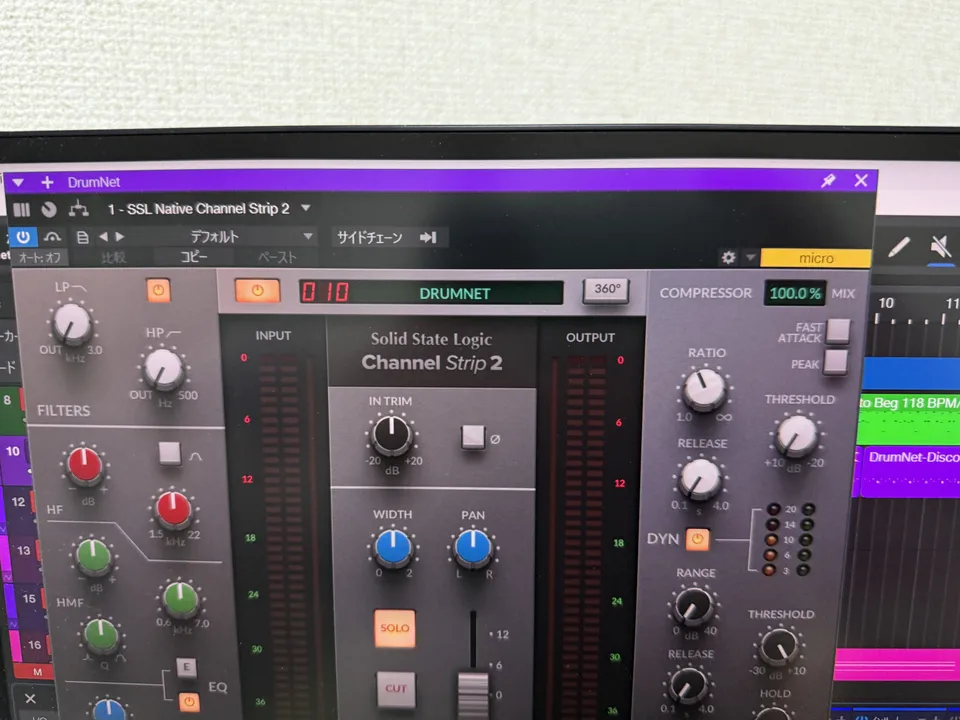
SSL Native Channel Strip 2 is a channel strip plugin from SSL Native.
It brings the SSL Large Console XL 9000 K, the huge analog console permanently installed in recording studios, to your DAW as a channel strip plugin.
What Is a Channel Strip?
In music production, a channel strip plugin is a software recreation of a mixing console channel strip.
A channel strip is the module on a mixing console that processes the audio of a single channel. It generally includes effects such as a preamp, EQ, compressor, and limiter.
With a channel strip plugin, you can not only set each of these effects individually but also adjust the parameters of the whole channel strip at once. This can greatly improve the efficiency of sound design and mixing.
Features
- Recreates an SSL console inside your DAW
- 4-band EQ (two shelving sections and two parametric sections) plus high-pass and low-pass filters
- EQ character switchable between E-Series and G-Series
- EQ section with anti-clamping technology
- Integrates with SSL 360, so you can control it from 360-compatible hardware surfaces such as the UC1 and UF8
Buying SSL Native Channel Strip 2
Bundle
The SSL Native Essentials Bundle, which pairs SSL Native Channel Strip 2 with SSL Native Bus Compressor 2, is the better deal. It is also available through SSL’s subscription.
Where can you buy it?
Overseas dealers
- Plugin Boutique
- Plugin Fox
- BestService
Japanese dealers Not listed in the original article.
Lowest Prices
SSL Greatest Hits Bundle (a bundle that includes Native Channel Strip 2)
- [87% off sale until 2025/10/15] ¥64,618 ⇒ ¥7,975 (*prices vary with exchange rates)
SSL Solid State Logic Native Channel Strip 2 & Harrison Consoles 32Classic Sale
- [91% off sale, 2024/12/13 – 12/20] ¥55,113 ⇒ ¥4,186 (*prices vary with exchange rates)
SSL Native Channel Strip 2 (standalone)
- [88% off, 2026/10/1 – 10/12] ¥25,970 ⇒ ¥3,180 (*prices vary with exchange rates)
Review (ver 2.6.6)
Overall rating: ★★★★★
Pros
- An official SSL plugin! Easy to use and sounds great
- Just run a signal through it and you get the SSL sound
- A console turned into a plugin that is easy to handle and looks just like the real thing
Cons
- The price is high
- Not for people who dislike the SSL sound
Recreating the SSL Console Sound
You can switch the EQ character between the SSL console’s E-Series and G-Series. One plugin does the work of two consoles.
Versatility
SSL Native Channel Strip 2 is highly versatile. Studio One also ships with a Channel Strip plugin, and a low cut, compressor, and 3-band EQ are the baseline for a channel strip.
Even when you compress hard, the sound stays tight instead of falling apart. I feel this is a trait unique to SSL plugins.
The compressor feels great, and combined with the gate and EQ it allows delicate sound shaping. The sound doesn’t break down even with extreme EQ settings, which is another plus. There are plenty of presets, so it is a good choice for people who want to start using channel strips.
UI Changes
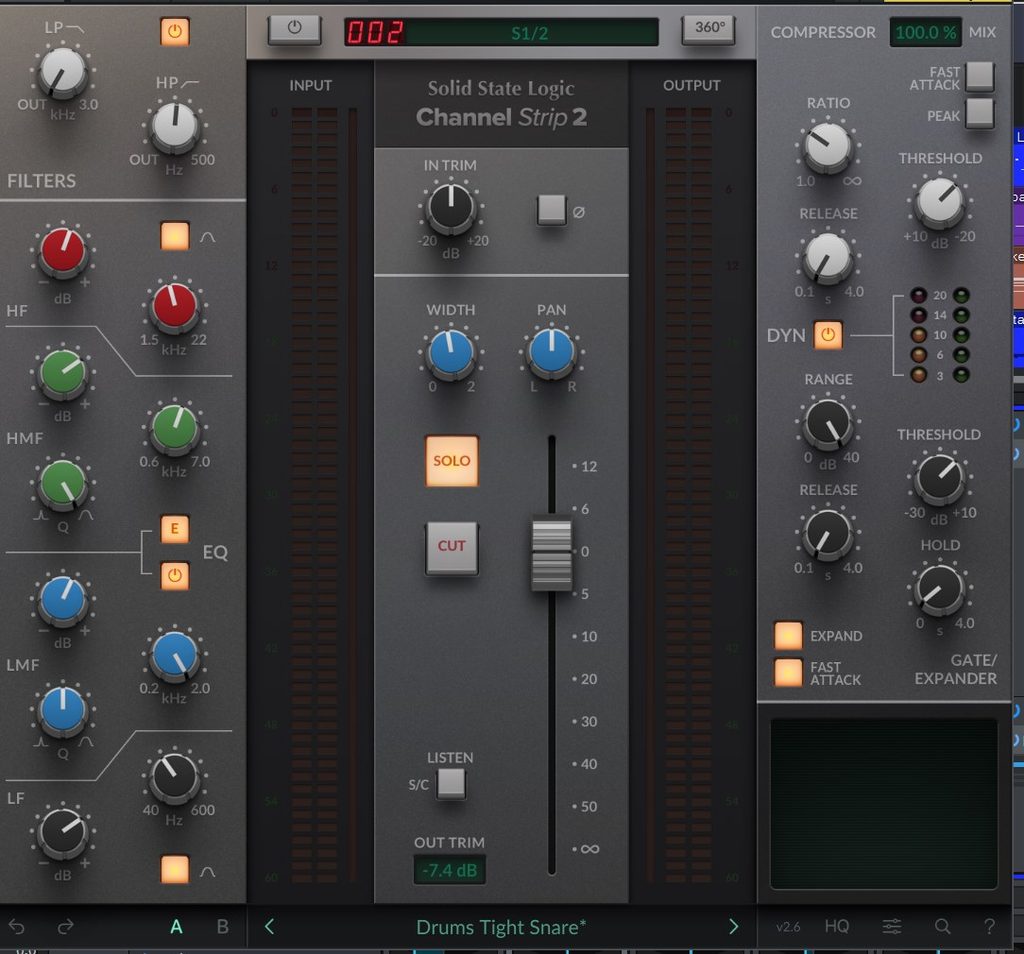
If you install the latest version as of 2024, SSL Native Channel Strip 2 ver 2.6.6, you get the UI shown on the right. The meters are now laid out side by side, and the routing section has moved to the lower right.
The ratio for parallel compression now appears as a 100% value, which makes it easier to understand.
Pan control and SOLO and CUT switches (linked to the DAW’s solo and mute switches) have also been added, so you can control them from the plugin without going back to the DAW’s mix window.
How to Use

Function Sections
SSL Native Channel Strip 2 has the following sections:
- Low-pass / high-pass section
- 4-band EQ section
- Fader section
- Dynamics section
You can think of it as replacing four plugins with one.
EQ Section
The EQ section has all the standard features you’d expect. Its distinguishing point is that low-pass and high-pass filters come in addition to the four bands.
| Parameter | Specification |
|---|---|
| LP/HP | Low-pass (30 Hz–3 kHz), high-pass (20–500 Hz) |
| HF | -20 to +20 dB / 1.50–22 kHz / bell curve switch |
| HMF | -20 to +20 dB / 0.60–7 kHz / Q width 2.5–0.5 |
| LMF | -20 to +20 dB / 0.2–2 kHz / Q width 2.5–0.5 |
| LF | -16.5 to +16.5 dB / 40–600 Hz / bell curve switch |
The E button switches the console character
You can switch the EQ character between the SSL console’s E-Series and G-Series. One plugin does the work of two consoles.
Dynamics Section
In the dynamics section of SSL Native Channel Strip 2, the compressor, gate, and expander are integrated into one.
The knobs above the dynamics section’s ON/OFF switch (DYN) are the compressor knobs.
| Parameter | Description |
|---|---|
| Compressor MIX | Wet/dry ratio of the compressor effect |
| Ratio | Compression ratio |
| Fast attack | Fast attack switch |
| Peak | Peak switch. When engaged, the knee changes from soft knee to hard knee |
| Threshold | The signal level above which the compressor starts working |
| Release | Time it takes for the compressor to “release” the signal |
Gate / Expander
| Parameter | Description |
|---|---|
| Range | Range over which the gate acts |
| Threshold | Gate threshold |
| Release | Gate release time |
| Hold | Gate delay time |
| EXPAND | Turns on expansion mode. The gate ratio becomes 2:1 to 40:1 |
| Fast attack | Turns on fast attack |
Fader Section
This is the part that works with the 360° Plug-in Mixer (it can be used without the 360° Plug-in Mixer).
Solo (solo playback of the track) and CUT (mute the track) work in sync with the DAW (when using VST3 in Ableton Live, Fender Studio Pro, or REAPER).
It provides fader volume control, TRIM to set the output gain, a phase-invert button, WIDTH to set the stereo width, and a pan fader.
When a sidechain input is used, pressing “Listen s/c” plays back the sidechain sound.
Routing Section
The clickable items are the Filter, EQ, and EXT check buttons, and the arrow buttons that appear on the left and right. Look for the pattern that gives you the sound you like.
Track Name Display
The track name display supports English only and appears in the top field.
Window Size
Right-click to bring up a scale-change window (50, 75, 100, 125, 150, 175, 200%).
You can also change the scale with the magnifying-glass button at the lower right.
HQ Mode and CPU Load
There is an “HQ” switch at the lower right that raises sound quality at the cost of more CPU load.
That said, the load isn’t that heavy, so it is a setting worth using actively.
Presets
The presets cover most common patterns.
SSL 360° Software
If you own SSL Native Channel Strip 2 and SSL Bus Compressor 2, you can launch the SSL 360° software and operate them like a console.
If you own the SSL UC1 hardware, you can turn the knobs on the real unit. I used to think the software would be pointless without the hardware, but the software itself is free to use.
You can also use it with other channel strip plugins, even without SSL Native Channel Strip 2 and SSL Bus Compressor 2. However, the knobs won’t be linked to each plugin’s functions, so you have to set them up yourself.
The 360° software is a standalone app. Launch your DAW and insert the SSL channel strip and bus compressor on your tracks, and they link automatically.
Because it is a standalone app, the type of DAW doesn’t matter.
Any DAW you can choose in the settings screen works, and it connects with most DAWs.
Digital Performer, Bitwig, Pyramix, and REAPER are all supported, so DAW integration shouldn’t be a problem.
Why Use the SSL 360° Software?
All the knobs are displayed at once, so you don’t have to open the plugin window every time.
If you select a track, pick a plugin to open, and repeat that every time, it’s manageable with about five tracks. But with 10 or 20 tracks it gets hard to find tracks, and clicking each time is a hassle. So the idea is: wouldn’t it be more efficient to keep one screen open and turn the knobs there?
If you keep a window with only the SSL 360° software ready, you can access it right away. If you don’t use the channel strip and bus compressor, though, it has no use.
Installation
Using SSL Native Channel Strip 2 requires an iLok account.
Installation is done through the SSL Download Manager.
To load it, choose “SSL Native Channel Strip 2” from the insert plugins.
SSL Console Plugins from Other Manufacturers
- Softube Console 1 (Console 1 owners only): Solid State Logic XL 9000 K
- Brainworx bx_console SSL 9000 J (an emulation of the SSL 9000 J)
- SSL EV2 Channel (an emulation of the SSL 4000)
Summary
SSL Native Channel Strip 2 is a channel strip plugin!
It recreates an SSL console in your DAW, and with EQ, dynamics, and fader integrated in one place, it can streamline your workflow.
The compressor gives you the SSL sound, so use it when you want to add a rock feel.
You might think SSL is still out of your league. But using good gear and stretching a little teaches you a lot. It is also a good plugin for DTM beginners who feel it’s too early for SSL, so don’t forget to grab it during the few valuable sale periods each year!
SSL Native Channel Strip 2 sale >>
FAQ
What is a channel strip?
A channel strip is the module on a mixing console that processes the audio of a single channel. It generally includes effects such as a preamp, EQ, compressor, and limiter.
How much does SSL Native Channel Strip 2 cost?
The regular price is $329.99 (around ¥55,940 including tax).
Is there a free trial?
SSL Native Channel Strip 2 has a 14-day free trial with no feature limitations.
Is there a subscription?
SSL Native Channel Strip 2 is included in the “SSL Complete Subscription,” available from $19.99 per month.
SSL Greatest Hits Bundle
The “SSL Greatest Hits Bundle (until 10/15),” which includes SSL Native Channel Strip 2, is on sale! You get three of SSL’s hit products together!
It bundles a flagship channel strip, bus compressor, and reverb into a super-value set!
- ◯ SSL Native FlexVerb
- ◯ SSL Native Channel Strip 2
- ◯ SSL G3 MultiBusComp
[87% off sale until 2025/10/15] ¥64,618 ⇒ ¥7,975 (*prices vary with exchange rates)
SSL (Solid State Logic) Latest Sale Information
Solid State Logic SSL Fusion Bundle (92% off until 4/16)
A super-value bundle that lets you buy all five SSL Fusion products in one purchase!
It costs the same as buying four of them individually, so you effectively get one free.
The original price is very high, so grab it during a sale with no hesitation!
[92% off sale, 2026/4/2 – 4/16] ¥172,588 ⇒ ¥12,951 (*prices vary with exchange rates)